Laptops & desktops / Review roundup
Chuwi UniBook
Intel Core 3 304 processor, Intel Graphics, 8GB of LPDDR5-6400 memory, and a 256GB PCIe 3.0 SSD
- 79.8%Notebookcheck
A dirt-cheap metal ultraportable with marathon battery life, held back by a dull screen and soldered memory
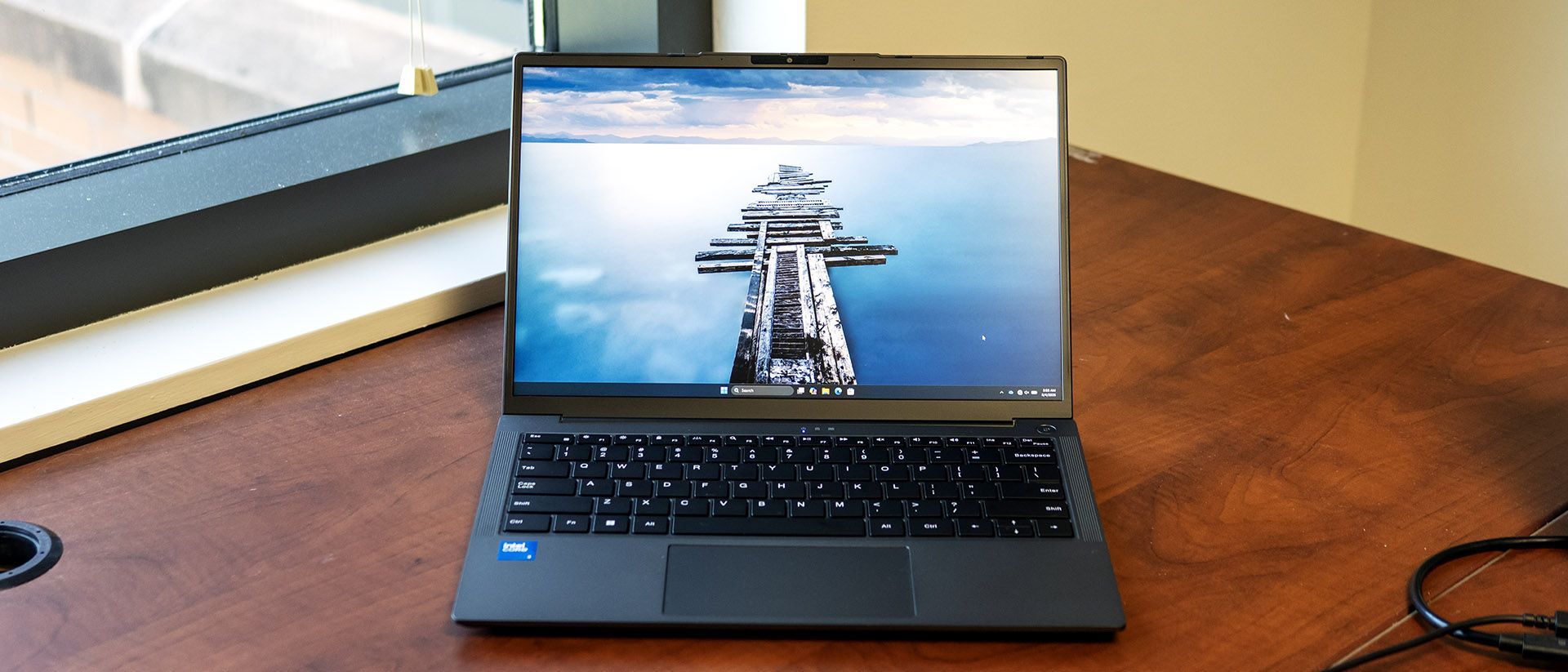
The Chuwi UniBook is built for shoppers who want a slim aluminum laptop for light typing, web browsing, and office work without spending more than $500. Its biggest strengths are a 14-hour battery endurance, a comfortable backlit keyboard, and an unusually generous array of ports. However, the washed-out 60% sRGB screen, weak speakers, slow 256GB SSD, and non-upgradeable 8GB of RAM strictly cap its lifespan. Rivals like the Apple MacBook Neo offer significantly faster processing and superior displays, but cost hundreds more.
Buy it if
- Students and office workers on a strict sub-$500 budget who prioritize battery longevity
- Users who need legacy ports like full-size HDMI, Ethernet, and multiple USB-A connections without dongles
- Lightweight writing, spreadsheets, and video streaming
Skip it if
- You edit photos or video and need accurate, saturated display colors
- You intend to multitask heavily with dozens of browser tabs or run creative workloads
- You want dependable domestic warranty and customer service support
Where to buy
We may earn a commission from purchases or qualifying sign-ups through our links. Affiliate links explained
What reviewers liked
- Thin, durable aluminum chassis weighing just 1.23 kg
- Class-leading battery life exceeding 14 hours in browsing tests
- Exceptional port variety including Gigabit Ethernet and dual USB-C ports
- Pleasant backlit typing keyboard
- Quiet operation with very low power consumption
What they didn’t
- Dull display with only 62% sRGB coverage and 299 nits brightness
- 8GB of soldered RAM cannot be upgraded
- Slow PCIe 3.0 SSD averaging under 300 MB/s transfer speeds
- Loud, hollow trackpad and weak speakers
- Warranty claims often require costly international shipping
Key specs
- Launch price
- $449
- Reported price
- $449
- Starting price
- $449
- Processor
- Intel Core 3 304 (5 cores / 5 threads, up to 4.3 GHz, Intel 18A)
- Graphics
- Intel Graphics (1 Xe3 core, 2.3 GHz)
- Display
- 14.0-inch 16:10 IPS matte, 1920 x 1200, 60 Hz
- Memory
- 8GB LPDDR5-6400 (soldered, single-channel)
- Storage
- 256GB PCIe 3.0 NVMe SSD (M.2 2280 replaceable)
- Battery
- 53.38 Wh, 65W USB-C charging
- Weight
- 1.23 kg (2.72 lbs)
- Dimensions
- 314.5 x 221 x 16.4 mm (12.4 x 8.7 x 0.65 inches)
In depth
Design, build and portability
Reviewers from Tom's Hardware, Wccftech, and Notebookcheck noted that the Chuwi UniBook looks and feels much more premium than its budget price implies. The chassis is made of dark grey anodized aluminum, measuring 16.4 mm thick and weighing 1.23 kg (2.72 pounds). Notebookcheck noted minimal flex in the lid and keyboard deck, while Wccftech appreciated the 180-degree lay-flat hinge design. Reviewers cautioned, however, that the smooth metallic surfaces readily collect finger smudges, requiring regular cleaning.
Display
The display is the laptop's most noticeable cost-cutting measure. While the 14-inch IPS panel provides a productive 16:10 aspect ratio and a crisp 1920 x 1200 resolution, lab measurements revealed significant shortcomings. Tom's Hardware measured a peak brightness of 298.8 nits and found the panel covers only 62% of the sRGB color gamut. Notebookcheck corroborated this gamut deficiency, noting roughly 60% sRGB coverage. Color reproduction is noticeably desaturated—Tom's Hardware observed that vibrant reds skew toward orange—making the panel poorly suited for creative work, though the matte anti-glare finish handles indoor reflections well.
Performance in everyday and demanding work
The UniBook is powered by Intel's entry-level Wildcat Lake chip, the Core 3 304, which couples one Cougar Cove performance core with four Darkmont low-power efficiency cores. In everyday productivity—such as basic document processing, web browsing, and 4K media playback—reviewers found the laptop quiet and responsive. However, multi-threaded capacity is limited. In Geekbench 6 testing, Wccftech recorded scores of 2,307 single-core and 5,835 multi-core, which Tom's Hardware noted falls far behind the Dell XPS 13 (7,952) and Apple MacBook Neo (8,920). In file transfer tests, Tom's Hardware clocked the 256GB SSD at an average speed of 294 MB/s, trailing typical NVMe speeds. With just a single Xe3 graphics core, 3D gaming is unviable outside of 2D indie titles or lightweight retro emulation.
Battery life
Battery endurance is the UniBook's headline achievement. Powered by a 53.38 Wh battery and a low-draw 15W platform, Tom's Hardware measured 14 hours and 14 minutes in its Wi-Fi browsing and streaming test at 150 nits, virtually matching the Dell XPS 13 (14:28) and outpacing the MacBook Neo (13:28). Notebookcheck and PC Perspective similarly recorded between 11 and 15 hours depending on task intensity. The included 65W USB-C charger replenishes the pack to roughly 60% capacity in one hour.
Keyboard, trackpad, speakers and webcam
The input setup drew mixed assessments. Reviewers praised the full-size chiclet keyboard, which includes white backlighting (a feature missing on the MacBook Neo) and provides comfortable key travel and spacing. The touchpad received criticism across multiple outlets; Wccftech and Tom's Hardware cited a loud, hollow click and an inconsistent clicking feel. Audio is another weakness: the downward-firing stereo speakers lack low-end resonance and sound tinny at higher volumes. The 720p webcam is serviceable for quick calls and includes a physical privacy shutter, but video feeds are soft and noisy in moderate lighting.
Ports and upgradeability
Connectivity is among the best in this price class. The chassis houses two USB 3.2 Gen 1 Type-C ports (both supporting USB Power Delivery and DisplayPort video out), two USB 3.2 Gen 1 Type-A ports, a legacy USB 2.0 port, an HDMI 1.4b port, a 3.5 mm audio jack, a microSD card reader, a Kensington lock slot, and a fold-out Gigabit Ethernet port. Wireless duties are handled by Wi-Fi 6 and Bluetooth 5.3. Upgradeability is a split picture: the 8GB of LPDDR5 RAM is permanently soldered to the motherboard in single-channel configuration, but the M.2 2280 NVMe storage slot can be accessed by removing the bottom plate to install a larger, faster drive.
Price and configurations
Chuwi offers the UniBook primarily in one configuration: the Intel Core 3 304, 8GB of LPDDR5-6400 RAM, 256GB SSD, and Windows 11 Pro for $449. While the initial price is low, reviewers stressed long-term ownership trade-offs. Tom's Hardware highlighted that Chuwi warranties often necessitate buyers paying substantial return shipping fees to mainland China for hardware repairs, which can erode the computer's value proposition should defects arise.
Is it worth the money?
Priced roughly $150 to $250 below the Apple MacBook Neo and Dell XPS 13, it undercuts the market significantly on hardware materials and ports, but sacrifices screen quality, memory ceiling, and local warranty support.
Also consider
- Apple MacBook Neo
Offers far faster processing speeds, superior build fit-and-finish, and a much brighter display, but starts at a higher price with fewer ports.
- Dell XPS 13 (Wildcat Lake)
Provides a substantially faster processor, 16GB RAM options, and reliable domestic customer service, though it costs notably more.
- Acer Swift Air 14
A budget-friendly 14-inch Windows laptop offering better display color calibration and upgradable memory paths for a slightly higher investment.
Reviews we read
This roundup summarizes professional reviews and published specifications; Next Interrupt did not test the product. Roundup updated November 2, 2026. How we work
- Tom's Hardware — Chuwi UniBook Review: A budget rival to the MacBook Neo and Dell XPS 13
- Wccftech — Chuwi UniBook Wildcat Lake 304 “Intel Core 3 304” Laptop Review – $449 MacBook Neo Competitor Worth It?