Laptops & desktops / Review roundup
Acer Swift Air 14
Intel Core Ultra 5 320
- 4.5 / 5TechRadar
- 4 / 5Tom's Guide
- 3.5 / 5Tom's Hardware
Exceptional battery life and dual Thunderbolt 4 ports offset chassis flex and a modest 350-nit display
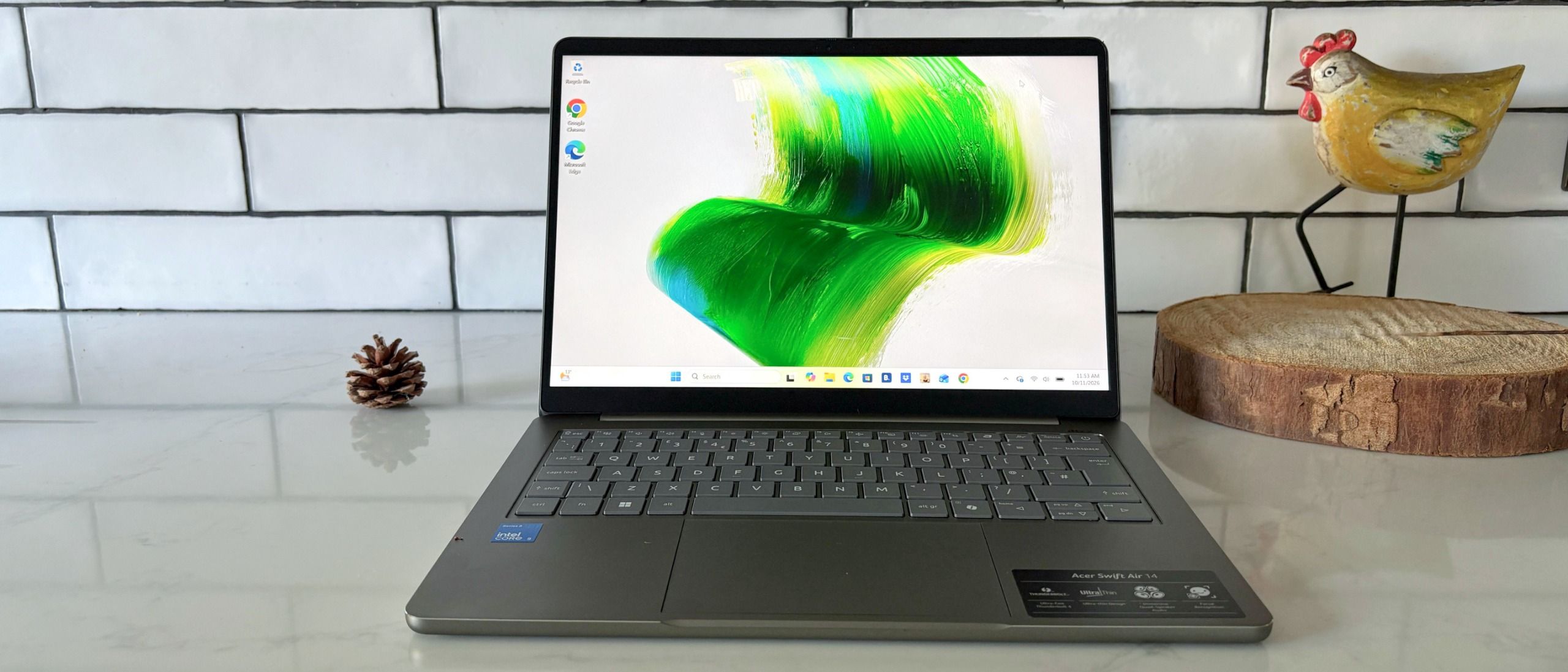
The Acer Swift Air 14 is an appealing budget ultraportable designed for students and mobile professionals who prioritize all-day battery life and standard connectivity over raw speed. Its biggest asset is endurance, clocking nearly 17 hours in independent web-browsing tests alongside dual Thunderbolt 4 ports. The main compromises are noticeable flex in the keyboard deck, a display limited to 350 nits, and soldered 8GB of memory. Compared with the Apple MacBook Neo, it falls behind in build rigidity and display brightness, but it delivers more ports and significantly better battery life.
Buy it if
- Students and commuters who need multi-day battery endurance without carrying a charger
- Shoppers looking for a sub-$700 laptop with Thunderbolt 4 connectivity
- Remote workers handling everyday web research, spreadsheets, and video calls
Skip it if
- Creators needing high-end GPU power or extra screen brightness for outdoor editing
- Users who require more than 8GB of memory for demanding computing workloads
- Buyers sensitive to keyboard deck flex or seeking full-bodied acoustic performance
Where to buy
We may earn a commission from purchases or qualifying sign-ups through our links. Affiliate links explained
What reviewers liked
- Near-17-hour battery life outlasts both the MacBook Neo and Dell XPS 13
- Dual Thunderbolt 4 ports and USB-A connectivity rare at this price point
- Smooth 120Hz refresh rate on a 16:10 matte IPS panel
- Featherweight 2.6-pound aluminum chassis that is easy to commute with
- Runs cool and quiet during routine multitasking
What they didn’t
- Noticeable flex in the keyboard deck and screen lid under pressure
- 350-nit maximum screen brightness struggles in bright outdoor light
- Base 8GB RAM is soldered and cannot be upgraded later
- Mediocre down-firing speakers and grainy 1080p webcam
- Heavy pre-installed bloatware out of the box
Key specs
- Launch price
- $699
- Reported price
- $530 to $699
- Starting Price
- $699
- Processor
- Intel Core Ultra 5 320
- Graphics
- Intel Graphics (Xe3)
- Memory
- 8GB LPDDR5X (soldered)
- Storage
- 512GB M.2 PCIe NVMe SSD
- Display
- 14-inch IPS, 1920 x 1200, 120Hz, matte, 350 nits
- Battery
- 70Wh (65W USB-C charging)
- Weight
- 2.6 lbs (1.19 kg)
- Dimensions
- 12.3 x 8.7 x 0.51 inches
- Ports
- 2x Thunderbolt 4, 1x USB-A 3.2 Gen 1, 3.5mm headphone jack
In depth
Design, build and portability
At 2.6 pounds (1.19 kg) and 0.51 inches thick, the Acer Swift Air 14 lives up to its moniker, delivering a compact, travel-ready profile that easily slips into a commuter backpack. The chassis is constructed from aluminum with diamond-cut edges and comes in subtle finishes such as Sage Green. While reviewers appreciated the clean, minimalist exterior, Tom's Hardware and Tom's Guide noted that structural rigidity is a clear trade-off: the center of the keyboard deck and the lid show obvious flex when moderate pressure is applied. It lacks the rigid feel of unibody alternatives like the MacBook Neo or Dell XPS 13, but the reduced weight makes it among the lightest 14-inch laptops in its bracket.
Display
The laptop features a 14-inch IPS panel with a 1920 x 1200 resolution, a 16:10 aspect ratio, and a 120Hz refresh rate. Reviewers found that the 120Hz panel makes web scrolling and window management feel noticeably fluid compared to typical 60Hz panels in this price category. The matte coating also helps suppress ambient indoor glare. However, display luminance is conservative at roughly 350 nits. Tom's Hardware noted that it looks dim beside the MacBook Neo's 500-nit panel and is not well suited for bright outdoor environments.
Performance in everyday and demanding work
Equipped with Intel's Core Ultra 5 320 and integrated Intel Xe3 graphics, the Swift Air 14 handles daily office tasks effortlessly. Outlets including PC Labs reported that document editing, video calls, and web browsing with dozens of tabs run without hitch, aided by silent fans and minimal heat output. However, Tom's Hardware and TechRadar emphasized that the Wildcat Lake architecture is built for efficiency rather than raw compute. It is not suited for intense 3D rendering or 4K timeline scrubbing, and the integrated graphics cap gaming performance strictly to casual or older esports titles.
Battery life
Battery endurance is the laptop's defining achievement. In Tom's Guide's battery rundown test, the Swift Air 14 recorded 16 hours and 52 minutes, significantly outpacing both the Dell XPS 13 (14 hours, 26 minutes) and the MacBook Neo (13 hours, 26 minutes). Tom's Hardware similarly measured over 16 hours of continuous web browsing, while TechRadar noted it easily covers two days of typical office work. A compact 65W USB Type-C adapter handles charging.
Keyboard, trackpad, speakers and webcam
The typing experience is functional but unexceptional. Key spacing is comfortable, but Tom's Guide observed that the keys feel slightly soft on bottom-out, exacerbated by the deck flex under spirited typing. The trackpad provides smooth multi-touch tracking and crisp clicks without rattling. The 1080p webcam supports infrared facial recognition for Windows Hello login, but Tom's Guide criticized its noisy, grainy video quality in normal indoor light. The down-firing stereo speakers lack low-end punch and produce tinny sound at high volume, as highlighted by TechRadar.
Ports and upgradeability
Connectivity is substantially broader than on typical budget ultraportables. Acer includes two high-speed Thunderbolt 4 ports, one USB-A 3.2 Gen 1 port, and a 3.5mm combo audio jack. The single USB-A port avoids the dongle requirement common to modern machines, though TechRadar observed that placing both Thunderbolt 4 ports along the left edge limits cable management options. Internally, the M.2 NVMe SSD is user-replaceable, but the 8GB of LPDDR5X system RAM is soldered and cannot be upgraded.
Price and configurations
The Acer Swift Air 14 retails at a launch price of $699 for the tested configuration featuring an Intel Core Ultra 5 320 CPU, 8GB of RAM, and 512GB of storage. Retail discounts have occasionally dropped sale pricing closer to $530. Tom's Hardware pointed out that bloatware is unusually heavy out of the box, requiring initial setup time to remove sponsored software. Nevertheless, its aggressive pricing positions it competitively against mid-range clamshells.
Is it worth the money?
At its $699 MSRP, the Swift Air 14 offers unmatched battery longevity and Thunderbolt 4 connectivity for the money. Frequent promotional discounts to the mid-$500 range make it an even stronger value for budget-conscious buyers.
Benchmarks
PERFORMANCE
Benchmarks
Nits (brightness)
Higher is better · nitsTom’s Guide · full test results ↗Published 2026-10-13 · checked 2026-10-13
Nits (brightness) · Acer Swift Air 14: Intel Core Ultra 5 320
Results apply to this publication’s tested models and settings. Check those details before comparing another review.
Test data and methodology
| Product | Result | Test scope |
|---|---|---|
| Acer Swift Air 14 | 350 | Reviewed model only |
Bars start at zero. Results apply to the tested configuration and settings. Missing products are never assigned zero.
Also consider
- Apple MacBook Neo
Provides a significantly more rigid aluminum unibody, a brighter 500-nit screen, and faster compute performance at $599, though it has fewer ports and shorter battery life.
- Dell XPS 13
Offers a stiffer chassis and higher-resolution touchscreen options, but costs more and trails in battery runtime and legacy port selection.
Reviews we read
This roundup summarizes professional reviews and published specifications; Next Interrupt did not test the product. Roundup updated November 7, 2026. How we work
- Tom's Guide — Acer Swift Air 14 review: An excellent budget laptop with battery to beat
- TechRadar — Acer Swift Air 14 review: small, light, and lasts a long time at an exceptional price
- Tom's Hardware — Acer Swift Air 14 review: Wildcat Lake and lots of ports at $699