Keyboards & peripherals / Review roundup
Razer Basilisk V4 Pro
Razer Basilisk V4 Pro
- 94%TweakTown
- 4 / 5TechRadar
An ergonomic wireless mouse packed with top-tier 8K tech, let down by a crowded thumb layout and high price
The Razer Basilisk V4 Pro is built for gamers and desktop power users who want a feature-dense, sculpted right-handed mouse with class-leading tracking and high polling rates. Its standout strengths are the 100-gram chassis—12 grams lighter than its predecessor—and long endurance reaching up to 200 hours on a standard 1,000 Hz connection. The main catch is an awkward thumb layout caused by an unnecessary dedicated AI button, alongside a steep $169.99 launch price. Against its primary competitor, the Logitech G502 X Plus, the Basilisk V4 Pro offers faster 8,000 Hz polling and longer battery life, but Logitech's button layout remains easier to reach for average and smaller hands.
Buy it if
- Palm and claw grippers with medium to large hands wanting an ergonomic work-and-play mouse
- Gamers with high-refresh monitors who benefit from native 8,000 Hz wireless polling
- Users seeking long wireless battery life with up to 200 hours on a 1,000 Hz connection
Skip it if
- Shoppers with smaller hands or fingertip grips who cannot easily reach the side buttons
- Esports players looking for an ultra-lightweight pointer under 60 grams
- Budget-conscious gamers unwilling to spend $169.99 on a mouse
Where to buy
We may earn a commission from purchases or qualifying sign-ups through our links. Affiliate links explained
What reviewers liked
- 100-gram chassis is roughly 12 grams lighter than the previous Basilisk generation
- Up to 200 hours of 2.4 GHz battery life at 1,000 Hz and 54 hours at 8,000 Hz
- Flawless Focus Pro 50K sensor tracking with native 8,000 Hz polling support
- Crisp, durable Gen-4 optical switches rated for 100 million clicks
- Versatile HyperScroll tilt wheel with free-spinning and notched modes
What they didn’t
- Front thumb paddle and extra buttons can feel crowded and difficult to reach
- Dedicated AI prompt shortcut feels like an unneeded software gimmick
- Expensive $169.99 price tag before adding optional wireless charging accessories
Key specs
- Launch price
- $169.99
- Reported price
- $169.99
- Sensor
- Razer Focus Pro 50K Optical Sensor Gen-3
- Max Sensitivity
- 50,000 DPI (930 IPS, 90G acceleration)
- Polling Rate
- Up to 8,000 Hz (Wireless & Wired)
- Weight
- 100 g (Black) / 101 g (White)
- Switches
- Razer Optical Mouse Switches Gen-4 (100M click rating)
- Battery Life
- Up to 200 hours (1,000 Hz 2.4 GHz), 54 hours (8,000 Hz), 275 hours (Bluetooth)
- Connectivity
- 2.4 GHz HyperSpeed Gen-2, Bluetooth 6.2, USB-C wired
- Programmable Controls
- Up to 14 customizable inputs (12 physical buttons)
In depth
Feel and build quality
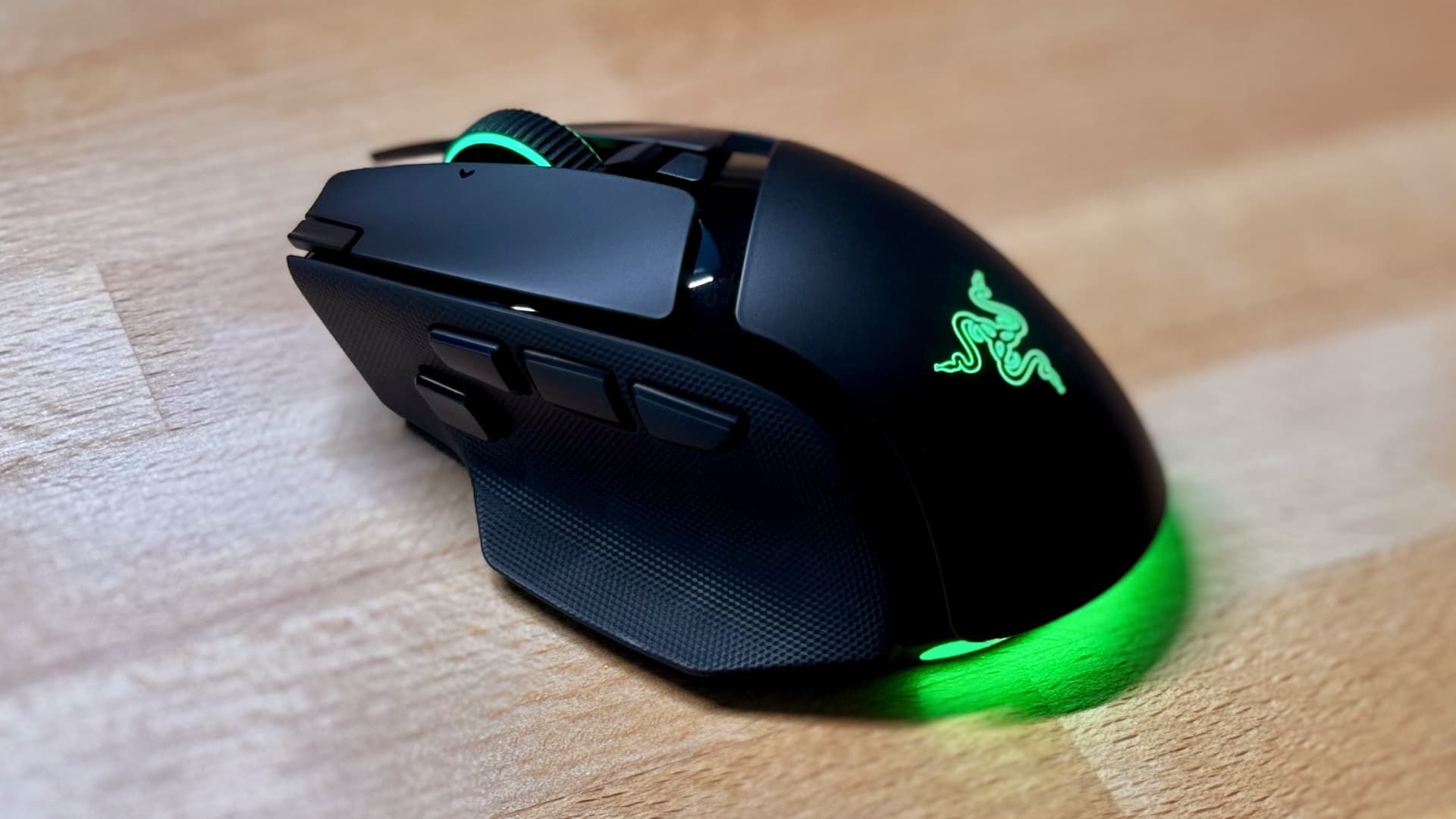
The Basilisk V4 Pro trims its curb weight down to 100 grams for the black version and 101 grams for the white model, shaving roughly 12 grams off the Basilisk V3 Pro 35K. Tom's Hardware noted that while 100 grams is nowhere near the ultra-lightweight territory of competitive esports mice, the weight reduction makes picking up and swiping the mouse noticeably easier. Reviewers at TechRadar praised the sturdy structural integrity and premium plastic finish, complemented by textured rubber side grips and 7 customizable Chroma RGB lighting zones. The HyperScroll tilt wheel retains electronic switching between tactile notched steps and a free-spinning mode. However, TechRadar felt the wheel's tactile mode sounded somewhat loud and mushy compared to traditional mechanical wheels.
Performance (sensor, switches, latency)
Internally, Razer outfitted the mouse with its Focus Pro 50K Gen-3 optical sensor, delivering a top sensitivity of 50,000 DPI, tracking speeds up to 930 IPS, and acceleration up to 90G. Tom's Hardware reported consistent, jitter-free tracking across varied desk surfaces, including clear glass measuring at least 4 mm thick. Both Tom's Hardware and TweakTown highlighted the native 8,000 Hz polling rate over both wireless HyperSpeed Gen-2 and wired connections, which minimizes input latency on 360 Hz and faster monitors. Primary clicks use Razer Gen-4 optical switches rated for 100 million activations. Tom's Hardware found them crisp and tactually responsive with zero debounce issues or unintended double clicks during testing.
Battery life and connectivity
Connectivity spans low-latency 2.4 GHz HyperSpeed Wireless Gen-2, Bluetooth 6.2, and wired USB-C. Tom's Hardware recorded official battery estimates of up to 200 hours over 2.4 GHz wireless when operating at a standard 1,000 Hz polling rate, and up to 275 hours on Bluetooth. Cranking the wireless polling rate to the maximum 8,000 Hz drains the battery much quicker, yielding approximately 54 hours. For recharging, users can connect the included braided USB-C cable or purchase Razer's standalone Mouse Dock V2 Pro ($69.99) or HyperFlux V2 wireless charging mat, which utilize a magnetic induction puck on the underside.
Software and customization
Razer Synapse manages button mappings across up to 14 customizable controls, fine-tuning DPI in single-digit increments, and configuring surface calibration. Reviewers focused heavily on two new hardware additions: a customizable 'Perfect 180' feature and a dedicated AI button. TweakTown highlighted the 'Perfect 180' binding as a notable advantage in fast-paced first-person shooters, letting players execute instantaneous turnaround sweeps at the push of a thumb control. In contrast, the dedicated AI prompt button—configured to summon ChatGPT to draft emails or summarize text—was viewed critically. TechRadar ran into verification errors and stalled generation requests when testing prompts, while Tom's Hardware dismissed it as an unnecessary gimmick that disrupted the physical harmony of the thumb cluster.
Comfort for long use
The Basilisk V4 Pro retains its sculpted right-handed design with an extended thumb rest flare, making it comfortable for long productivity days and extended gaming sessions. It favors full-palm and relaxed claw grips, but reviewers noted distinct ergonomic tradeoffs. TechRadar pointed out that users with smaller hands or fingertip grips will find the mouse bulky and have trouble accessing the forward buttons comfortably. Tom's Hardware observed that introducing a third side button pushed the standard thumb keys slightly rearward, leaving the front paddle positioned where it can be accidentally pressed when lifting the mouse during frantic mouse repositioning.
Price
Razer launched the Basilisk V4 Pro at $169.99 for both black and white editions. Retailers currently list the mouse at its $169.99 MSRP. TechRadar and Tom's Hardware both flagged the price as steep, noting that it carries a $30 to $40 premium over earlier Basilisk revisions and costs over $200 if bundled with the optional Mouse Dock V2 Pro.
Is it worth the money?
At $169.99, the Basilisk V4 Pro commands a high price for an all-purpose gaming mouse. Bundling it with the optional Mouse Dock V2 Pro raises the package price to $209.99.
Also consider
- Logitech G502 X Plus
The closest ergonomic competitor with hybrid optical-mechanical switches and a slightly more natural thumb button layout, frequently discounted below $160.
- Razer Basilisk V3 Pro 35K
Offers an almost identical shape, free-spinning scroll wheel, and strong tracking for around $30 to $40 less if you do not need 8,000 Hz polling.
- Razer DeathAdder V4 Pro
A lightweight 56-gram ergonomic design built purely for competitive shooter players who prioritize low inertia over extra buttons and scroll-wheel tricks.
Reviews we read
This roundup summarizes professional reviews and published specifications; Next Interrupt did not test the product. Roundup updated November 6, 2026. How we work
- TechRadar — I wanted to love the Razer Basilisk V4 Pro gaming mouse, but there were just a few too many flaws
- TweakTown — Razer Basilisk V4 Pro Wireless Gaming Mouse Review - Ergonomic Perfection
- Tom's Hardware — Razer Basilisk V4 Pro Review: Tried and true and now with AI