Laptops & desktops / Review roundup
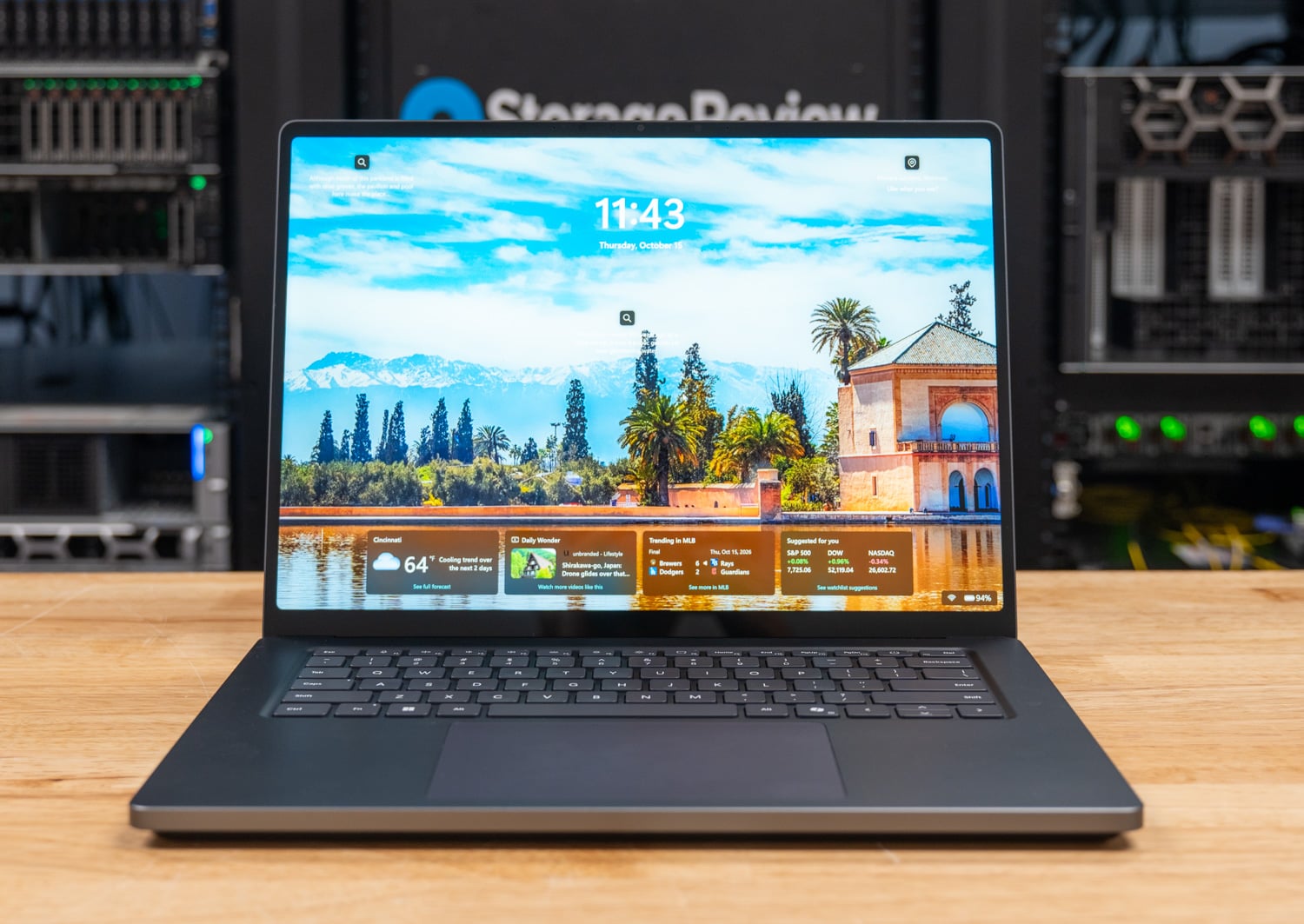
Microsoft Surface Laptop Ultra for Business
20-core, 128GB, 1TB, as tested
- 87%Notebookcheck
A massive 128GB unified memory milestone for local AI that is tempered by display quirks and thermal cutoffs
The Surface Laptop Ultra for Business is built specifically for machine learning engineers and developers who need massive unified memory to run large 30B-plus parameter language models on local hardware. Its standout capability is allowing up to 96GB of memory allocation to the Blackwell GPU, delivering multithreaded compiling and local AI inference speeds unreachable on 16GB or 24GB discrete laptop graphics. However, high memory latency, sudden thermal power cutoffs during sustained FP64 stress tests, and a steep price tag limit its general appeal. Compared to the Apple MacBook Pro 16, it offers the benefit of native Windows and CUDA environments, but trails in single-threaded speed, display responsiveness, and battery endurance.
Buy it if
- Machine learning developers running 20B to 35B+ parameter models locally without cloud dependencies
- Software engineers compiling massive multi-threaded codebases in native Arm64 environments
- Technical professionals needing Windows, CUDA acceleration, and large unified memory in one chassis
Skip it if
- Your workflow prioritizes single-threaded responsiveness or legacy x86 application emulation
- You require all-day battery life away from an outlet under heavy GPU computing workloads
- You do color-critical print and video mastering requiring hardware-level Adobe RGB calibration
Where to buy
We may earn a commission from purchases or qualifying sign-ups through our links. Affiliate links explained
What reviewers liked
- 128GB of unified memory allows running local 35B coding models at up to 89 tokens per second
- Multi-threaded CPU compiling speed finished LLVM in 206 seconds, leading the category
- Bright 15-inch 2,000-nit mini-LED touchscreen with productivity-focused 3:2 aspect ratio
- Tactile keyboard paired with a precise, responsive haptic glass touchpad
- Magnetic Connect breakaway USB-C charging cord and labeled internal repair guides
What they didn’t
- StorageReview observed hard power shutdowns under heavy all-core FP64 OpenBLAS workloads
- Slow display pixel response times cause noticeable ghosting and mini-LED halo blooming
- Battery life drops significantly under combined CPU and Blackwell GPU loads
- Top-end 128GB configuration reaches a prohibitive price of $5,899.99
Key specs
- Launch price
- $2,599.99 (base 24GB/512GB); $5,899.99 (tested 128GB/1TB)
- Reported price
- $2,599.99 - $5,899.99
- Display
- 15.0-inch PixelSense Ultra Mini-LED IPS (3270 x 2180, 120Hz, 2,000 nits peak HDR, 1,344 dimming zones)
- Processor
- Nvidia RTX Spark N1X (20-core Grace Arm CPU, 6,144-core Blackwell GPU)
- Memory
- 128GB LPDDR5X-9400 unified memory
- Storage
- 1TB PCIe NVMe SSD (user-replaceable M.2)
- Battery
- 92Wh (Microsoft claims up to 15 hours video, 12 hours web)
- Weight
- 4.4 lbs (2.0 kg)
- Operating System
- Windows 11 Pro 26H1 on Arm
- Connectivity
- Wi-Fi 7, Bluetooth 5.4, 3x USB-C (USB4), 1x USB-A, HDMI 2.1b, SD card reader
In depth
Design, build and portability
Reviewers from Windows Central and Tom's Hardware praise the Surface Laptop Ultra for its rigid CNC-machined aluminum chassis and refined industrial design, calling it the sturdiest clamshell Microsoft has produced. At 4.4 pounds (2.0 kilograms) and roughly 0.67 inches thick, it carries noticeable heft compared to thin-and-light portables, placing it firmly in the mobile workstation category. The hinge opens smoothly with one hand, although CNET noted the absence of an indent or lip on the front edge makes finding purchase to open the lid slightly awkward. Cooling vents are positioned discreetly along the rear and underside, maintaining a clean aesthetic on a desk.
Display quality and HDR
The 15-inch PixelSense Ultra panel is a 3:2 aspect ratio IPS display with a 3270 x 2180 resolution, a 120Hz refresh rate, and a mini-LED backlight featuring 1,344 local dimming zones. Windows Central and Tom's Hardware highlighted its peak brightness, which Microsoft rates up to 2,000 nits for HDR playback. However, Notebookcheck and CNET both identified noticeable flaws: pixel response times are relatively slow, resulting in ghosting during high-framerate movement, while high-contrast edges exhibit halo blooming around bright UI elements on dark backgrounds. CNET also criticized Windows color management, noting that the system restricts users to basic Vivid (DCI-P3) and clamped sRGB profiles without support for Adobe RGB or professional reference target locks.
Performance in everyday and demanding work
Equipped with Nvidia's RTX Spark N1X superchip, the tested unit pairs a 20-core Grace Arm CPU with a 6,144-core Blackwell RTX GPU and 128GB of unified memory. StorageReview reported that the machine ran a 35-billion-parameter local coding agent at 89 tokens per second, utilizing up to 96GB of memory allocated directly to the GPU—a task that exceeds the physical VRAM capacity of discrete laptop graphics. In LLVM compiling, the N1X finished in 206 seconds, outpacing modern x64 laptops by over 35 percent. However, StorageReview discovered a critical caveat: during an all-core OpenBLAS double-precision (FP64) solve, two separate review units suffered sudden hard power cutoffs under the heavy load. Single-core performance also trailed competitors; Tom's Hardware recorded a single-core Geekbench 6 score of 3,151, falling well behind Apple's M-series chips, while memory latency reached 251 ns. Reviewers also noted that Windows defaulted to an efficiency power plan when plugged in, reducing throughput by 25 to 40 percent until manually set to Best Performance.
Battery life and power efficiency
Battery endurance is adequate for general tasks but drops rapidly under computational loads. CNET recorded approximately 10.5 hours in continuous web-browsing testing, compared to Microsoft's official claims of up to 12 hours active web usage and 15 hours of video playback. Windows Central found the 92Wh battery sufficient to complete a standard 8-hour workday of light productivity, but noted that engaging the Blackwell GPU drains the system quickly. Testing referenced by Notebookcheck and Linus Tech Tips confirmed that while idle and light Arm64 tasks sip power, heavy mixed workloads draw significant wattage, falling well short of runtimes posted by the Apple MacBook Pro 16.
Keyboard, trackpad, speakers and webcam
Reviewers universally praised the input hardware. Windows Central and Gizmodo commended the keyboard for its tactile feedback, stable keycaps, and comfortable travel. The large haptic glass trackpad was highlighted by Zac Bowden as one of the best on Windows, integrating seamlessly with Windows 11 haptic cues to deliver precise feedback. The audio system features balanced quad speakers with clear stereo separation and good low-end response. A 1080p webcam supports fast Windows Hello facial recognition, though Tom's Hardware and user testers observed audible coil whine emerging from under the keyboard deck when the Blackwell graphics cores operate under peak compute load.
Ports and upgradeability
Port selection is well-rounded for a modern workstation. The chassis provides three USB-C ports with USB4 transfer speeds, one USB-A port for legacy peripherals, a full-sized HDMI 2.1b port, a 3.5mm combo audio jack, and a full-size SD card slot. Microsoft also debuted Magnetic Connect, a breakaway magnetic USB-C connector that prevents accidental yank damage while keeping USB-C standards compatibility. Tom's Hardware pointed out that while the 128GB unified memory is permanently soldered, Microsoft incorporated interior Wayfinder markings and QR-code service guides, allowing straightforward replacement of the modular M.2 NVMe SSD.
Price and configurations
The Surface Laptop Ultra begins at $2,599.99 for an 18-core N1X model with 24GB of unified memory and a 512GB SSD. The top-tier configuration tested by reviewers—equipped with the 20-core N1X chip, 128GB of unified memory, and a 1TB SSD—lists at $5,899.99 on the Microsoft Store. While the base price is comparable to high-end mobile workstations, the top-tier build represents a major capital investment that is justifiable primarily for development teams and researchers who require local execution of large AI models without deploying dedicated server infrastructure.
Is it worth the money?
The steep entry price and near-$6,000 ceiling make this a niche workstation investment, worthwhile almost exclusively for engineers who require 64GB to 96GB of assignable GPU memory for local AI and LLM workflows.
Also consider
- Apple MacBook Pro 16 (M4/M5 Max)
Delivers superior battery life, faster single-core performance, and a blooming-free display, though it cannot run native Windows or CUDA workloads.
- HP OmniBook Ultra 16
An alternative RTX Spark laptop featuring a 3K OLED screen and verified stability through sustained FP64 double-precision stress tests.
- ASUS ProArt P16 (RTX Spark)
Offers the same Nvidia N1X architecture in a lighter 3.9-pound chassis with an OLED display and creative dial controls.
- Razer Blade 16
A traditional x64 laptop with a discrete RTX 5090 GPU that delivers faster raw gaming and 3D rendering speeds, albeit capped at 24GB of dedicated VRAM.
Reviews we read
This roundup summarizes professional reviews and published specifications; Next Interrupt did not test the product. Roundup updated October 22, 2026. How we work
- StorageReview — Microsoft Surface Laptop Ultra for Business Review: RTX Spark N1X Runs a 35B-Parameter Coding Agent at 89 Tokens per Second, With One Major Caveat
- Notebookcheck — Microsoft Surface Laptop Ultra RTX Spark Review - The 2000-nits Mini-LED panel is a problem
- Tom's Hardware — Microsoft Surface Laptop Ultra review: RTX Spark in a straight-up beautiful Windows PC