Laptops & desktops / Review roundup
Framework Laptop 12
Intel Core 7 350 processor and 32GB of DDR5 memory
- 8.4/10Engadget
- Editor's ChoiceTom's Guide
A wonderfully repairable 2-in-1 elevated by Intel Wildcat Lake silicon but hindered by a dull display
The refreshed Framework Laptop 12 is a compelling buy for students, tinkerers, and mobile Linux enthusiasts who prioritize right-to-repair hardware and modular expansion above all else. Its greatest asset is the transition to Intel's Core Series 3 architecture, which runs substantially cooler and delivers usable all-day endurance without thermal throttling. The primary compromise remains its glossy 60Hz display, which suffers from narrow color reproduction and heavy glare outdoors. While mainstream competitors like the Apple MacBook Neo or Dell XPS 13 deliver superior screens and aluminum builds at similar prices, neither offers this level of modularity or user freedom.
Buy it if
- Right-to-repair advocates and tinkerers who want modular ports and upgradeable internals
- Linux users seeking polished out-of-the-box Fedora integration and hardware kill switches
- Mobile professionals needing a rugged, compact 2-in-1 for word processing and code compilation
Skip it if
- Color-critical work such as professional photo or video grading is required
- You demand a slim, edge-to-edge metal chassis rather than a chunky rubberized plastic shell
- You need dual-channel memory bandwidth for demanding graphics processing
Where to buy
We may earn a commission from purchases or qualifying sign-ups through our links. Affiliate links explained
What reviewers liked
- Fully modular Expansion Card system and completely user-serviceable internals
- Intel Core Series 3 silicon fixes previous thermal throttling and improves efficiency
- Added keyboard backlighting and responsive fingerprint authentication
- Hardware privacy switches for both microphone and webcam
- Mainboard backwards compatibility allows previous owners to upgrade without buying a new chassis
What they didn’t
- Display gamut is limited to roughly 65% sRGB and locked to a 60Hz refresh rate
- Glossy soda-lime glass attracts strong reflections in bright environments
- Memory is restricted to a single SO-DIMM channel
- Higher-tier configurations carry a substantial price tag compared to mainstream rivals
Key specs
- Launch price
- $549 DIY / $699 Pre-built ($1,549 as reviewed)
- Reported price
- $549 to $1,549 depending on tier and components
- Starting Price (DIY / Pre-built)
- $549 DIY / $699 Pre-built ($1,549 as tested)
- Processor
- Intel Core 7 350 (6 cores: 2 P-cores + 4 LP-E cores, up to 4.8 GHz)
- Graphics
- Intel Graphics (2 Xe3 cores, up to 2.6 GHz)
- Memory
- 32GB DDR5-5600 (Single-channel SO-DIMM, expandable to 64GB)
- Storage
- 512GB M.2 2230 NVMe SSD (user-replaceable)
- Display
- 12.2-inch 1920x1200 IPS touchscreen, 60Hz, 16:10
- Battery
- 50 Wh lithium-polymer
- Dimensions & Weight
- 18.45 x 287 x 213.88 mm (0.73 x 11.3 x 8.4 inches), 1.3 kg (2.87 lbs)
- Connectivity
- Wi-Fi 7 (Intel BE213), Bluetooth 5.4, 4x Expansion Card bays (2x Thunderbolt 4)
In depth
Design, build and portability
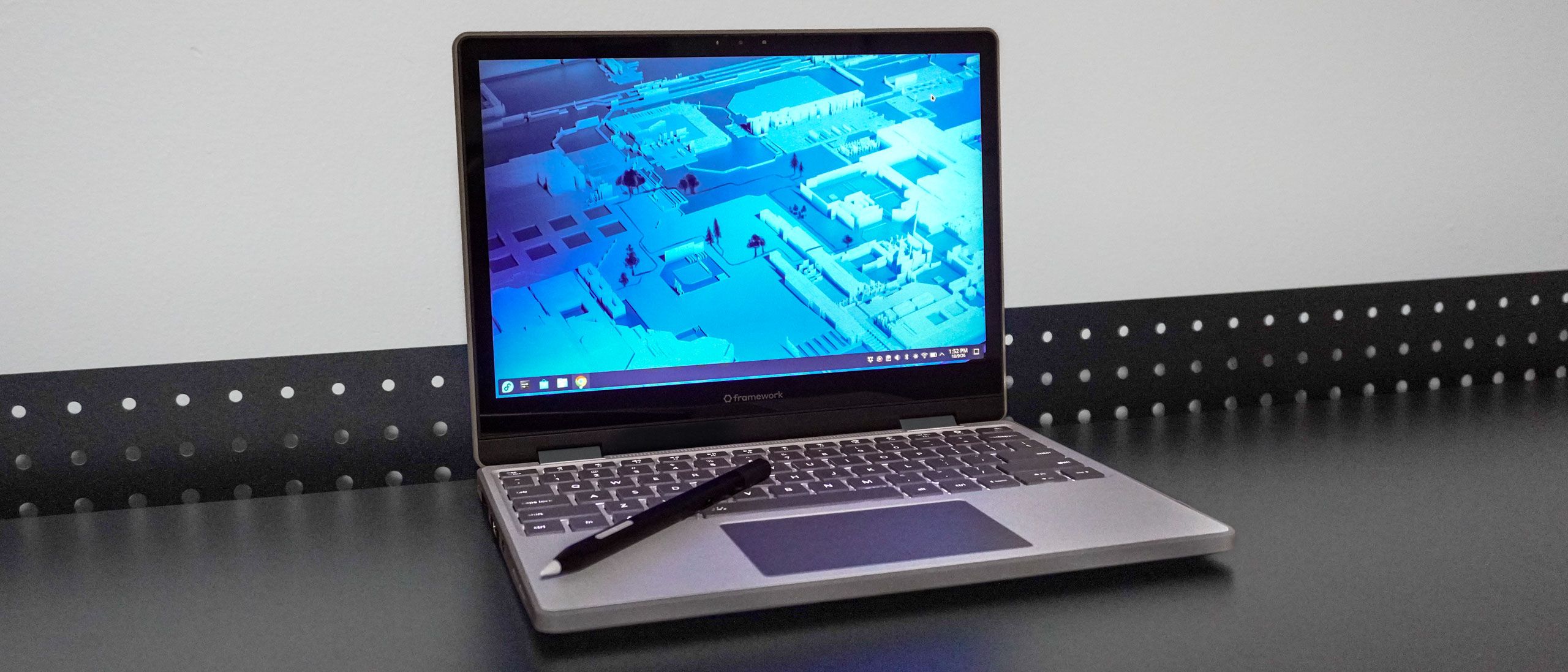
The Framework Laptop 12 maintains the same exterior footprint as its predecessor, measuring 18.45 mm thick and weighing 1.3 kg (2.87 lbs). Built using a blend of rigid PC/ABS plastic reinforced with an inner metal structure and shock-absorbing TPU bumpers along the perimeter, reviewers at Tom's Guide noted that while it is chunkier than conventional aluminum ultraportables, the rugged shell feels durable enough to withstand daily commute bumps. The 360-degree zinc-alloy hinge allows the device to convert smoothly into tent and tablet configurations. Engadget praised the colorful aesthetics, which come in playful shades like Sage, Bubblegum, and Lavender alongside Gray and Black, avoiding the sterile look common to enterprise notebooks.
Display
Reviewers unanimously agreed that the 12.2-inch 1920x1200 (16:10) IPS touchscreen remains the machine's weakest component. In lab evaluations, Tom's Hardware measured peak brightness at 451 nits, easily exceeding Framework's official 400-nit claim. However, color fidelity is subpar: Tom's Hardware recorded just 64.9% coverage of the sRGB color space, matching Framework's modest 50% NTSC specification. Tom's Guide pointed out that the soda-lime protective glass is highly reflective, which compounds visibility issues under bright office lighting or direct sunlight. The panel also remains locked to a standard 60Hz refresh rate without variable refresh support.
Performance in everyday and demanding work
The transition to Intel's Core 7 350 processor (Wildcat Lake) rectifies the thermal problems seen on the first-generation chassis. Built with two performance cores and four low-power efficient cores (6 threads) running at up to 4.8 GHz, the chip operates at a 15W sustained power draw with boost bursts up to 35W. Engadget noted that everyday operations run smoothly with zero stuttering, and lightweight gaming saw substantial improvements: titles like Fortnite hummed along at native resolution, and Cyberpunk 2077 held a steady frame rate at low settings without thermal throttling. Phoronix documented an average system power draw of 16.69 Watts across more than 200 Linux benchmarks. However, Tom's Hardware cautioned that because Wildcat Lake routes memory through a single SO-DIMM channel, bandwidth-heavy multi-core computations and intensive GPU tasks trail systems equipped with dual-channel or unified memory architectures.
Battery life
Despite retaining the original model's 50 Wh battery pack, energy efficiency is markedly improved thanks to the updated silicon. In Tom's Hardware's continuous web browsing loop over Wi-Fi under Fedora 44 (standardized to 150 nits), the Core 7 350 configuration averaged 9 hours and 16 minutes across three test passes. Tom's Guide mirrored this finding, recording an identical 9:16 runtime in its web battery test. While this trails ARM-based ultraportables like Apple's MacBook line that regularly exceed 14 hours, reviewers noted it represents nearly a two-hour jump over the 13th Gen predecessor under similar real-world workflows.
Keyboard, trackpad, speakers and webcam
Framework addressed previous omissions by introducing a white LED backlit keyboard and embedding a fingerprint scanner into the power button. Tom's Guide commended the typing deck for its deep, tactile travel and comfortable key spacing, and highlighted that the keyboard runs open-source ZMK firmware for custom key mappings. The mechanical touchpad offers clean tracking, though RTINGS noted it relies on a traditional diving-board click mechanism rather than modern haptics. The 1080p webcam produces usable video for conference calls, though Tom's Hardware criticized its low-light grain; both the webcam and microphone can be fully severed via physical sliding privacy kill switches on the top bezel. The stereo downward-firing speakers sound clear for voices, but lack bass response.
Ports and upgradeability
Serviceability remains the core attraction of the Framework platform. The Laptop 12 features four modular Expansion Card slots alongside a fixed 3.5mm combo audio jack. With this generation, two of the expansion bays now offer full Thunderbolt 4 bandwidth, enabling eGPU connectivity and multi-monitor docking stations. Users can hot-swap USB-C, USB-A, HDMI, DisplayPort, or MicroSD cards within seconds. Inside, loosening five captive fasteners grants complete access to the replaceable M.2 2230 SSD, the single SO-DIMM memory slot, the modular Intel BE213 Wi-Fi 7 card, and the screwed-in battery pack. Existing owners can upgrade their first-generation unit simply by purchasing the new Wildcat Lake mainboard.
Price and configurations
Framework offers the Laptop 12 in both DIY kits and pre-built models. The barebones DIY Edition starts at $549 for the Core 3 304, rising to $779 for the Core 5 320 and $999 for the Core 7 350, requiring buyers to source their own storage, RAM, and operating system. Pre-assembled configurations begin at $699. The tested configuration—equipped with the Core 7 350, 32GB of DDR5 memory, 512GB NVMe SSD, and Windows 11 Pro—retails for $1,549, though opting for preloaded Fedora Linux reduces the price by $100 to $1,449. Engadget noted that while the entry price is accessible, heavily specced pre-built versions carry a premium that approaches full-size flagship portables.
Is it worth the money?
The barebones DIY edition provides the best price-to-performance value for shoppers who can supply their own RAM and SSD, whereas maxed-out pre-built configurations face stiff competition from mainstream premium thin-and-lights.
Benchmarks
PERFORMANCE
Benchmarks
sRGB
Higher is better · %Tom’s Guide · full test results ↗Published 2026-10-13 · checked 2026-10-21
sRGB · Framework Laptop 12: Intel Core 7 350 processor and 32GB of DDR5 memory
Results apply to this publication’s tested models and settings. Check those details before comparing another review.
Test data and methodology
| Product | Result | Test scope |
|---|---|---|
| Framework Laptop 12 | 68.2 | Reviewed model only |
Bars start at zero. Results apply to the tested configuration and settings. Missing products are never assigned zero.
Also consider
- Framework Laptop 13 Pro
Offers dual-channel LPCAMM2 memory, faster Core Ultra silicon, and a superior 2.8K display in an aluminum chassis for users needing more power.
- Apple MacBook Neo
Provides significantly longer battery life, a premium unibody chassis, and a better color-accurate screen, though it cannot be upgraded or repaired.
- Dell XPS 13 (Wildcat Lake)
A traditional, sleek Windows ultraportable with higher build refinement and superior display options at a comparable price point.
Reviews we read
This roundup summarizes professional reviews and published specifications; Next Interrupt did not test the product. Roundup updated October 21, 2026. How we work
- Tom's Guide — I spent two weeks testing the Framework Laptop 12 and this repairable 2-in-1 is my new compact daily driver
- Tom's Hardware — Framework Laptop 12 (Wildcat Lake) review: Growing up amid an unprecedented shortage
- Engadget — Framework Laptop 12 (2026 upgrade) review: Intel's Core Series 3 fixes a key flaw