Laptops & desktops / Review roundup
Dell XPS 14 (2026)
DA14260, Core Ultra X7 358H / 32GB / 1TB / OLED
- 87%Notebookcheck
- 4/5Tom's Guide
- 4/5Tom's Hardware
- 4.0/5PCMag
- 4/5Trusted Reviews
Dell fixes ergonomics and adds Panther Lake efficiency to make the XPS 14 a refined ultraportable
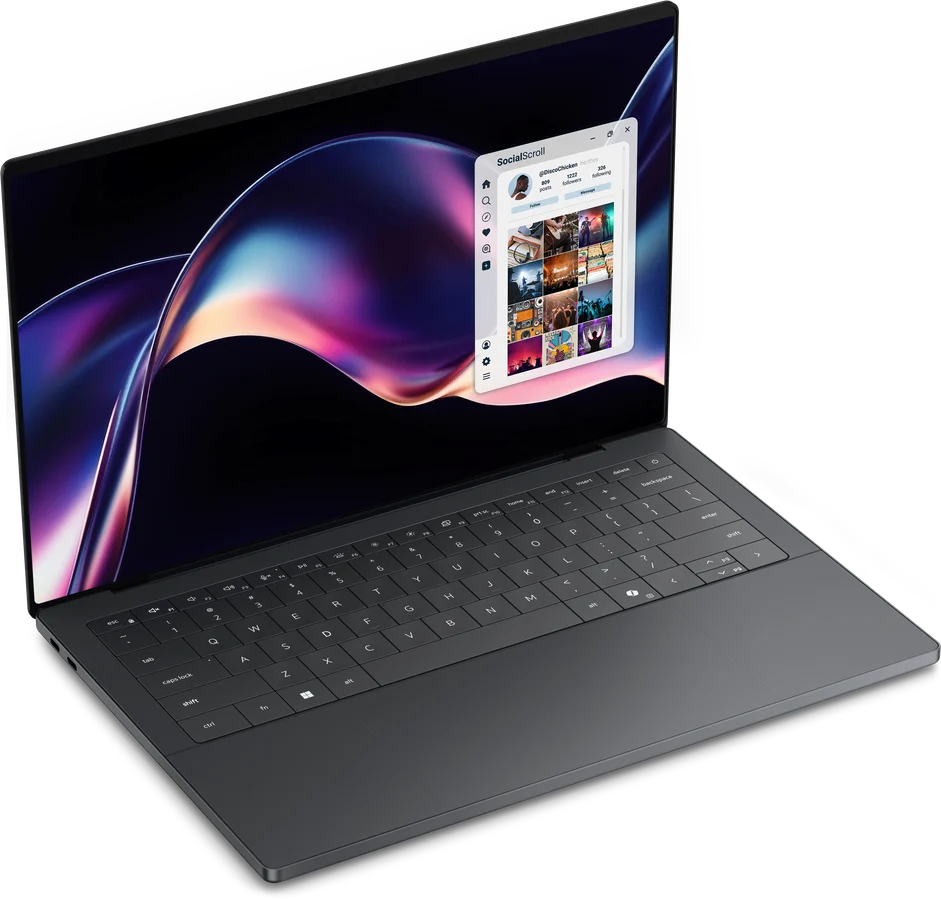
The Dell XPS 14 (2026) is built for mobile professionals who want a premium Windows ultrabook with high build quality, crisp OLED visuals, and capable graphics. Its greatest asset is the Intel Core Ultra X7 chip, which blends snappy productivity with Arc B390 graphics that approach entry-level discrete GPUs. The catch is an all-USB-C port layout that eliminates the legacy microSD card slot and requires adapters for standard peripherals. While Apple's MacBook Pro 14 still leads in sustained creative rendering speed and unified memory bandwidth, the XPS 14 stands as Dell's most practical ultraportable in years.
Buy it if
- Professionals seeking a compact Windows laptop with a sharp 2.8K OLED touchscreen
- Users who need competent integrated graphics for photo editing and light 1080p gaming without the bulk of a gaming laptop
- Commuters prioritizing all-day battery life in a stiff, three-pound aluminum chassis
Skip it if
- You rely frequently on legacy USB-A accessories, HDMI cables, or full-sized SD cards without carrying dongles
- You need after-purchase memory upgrades or maximum sustained multi-threaded rendering performance
Where to buy
We may earn a commission from purchases or qualifying sign-ups through our links. Affiliate links explained
What reviewers liked
- Physical function row returns to replace the divisive capacitive touch strip
- Integrated Arc B390 graphics delivers graphics speed rivaling entry-level discrete chips
- Vibrant 2.8K tandem OLED display with smooth 120Hz refresh rate
- Solid battery life that reaches over 12 hours on OLED and exceeds 20 hours on LCD models
- Crisp 4K webcam and clear, loud 10W speaker system
What they didn’t
- Port selection is limited to three Thunderbolt 4 ports with no USB-A or SD card reader
- Memory is fully soldered and non-upgradeable
- Key travel is relatively shallow and the zero-lattice layout can take time to adjust to
Key specs
- Launch price
- $2,199 as tested ($1,599 base)
- Reported price
- $1,850 to $2,199
- Starting Price
- $1,599 ($2,199 as tested)
- Processor
- Intel Core Ultra X7 358H (16 cores, up to 4.8 GHz)
- Graphics
- Intel Arc B390 (integrated, 12 Xe3 cores)
- Memory
- 32GB LPDDR5X-9600 (soldered)
- Storage
- 1TB PCIe Gen 4 NVMe M.2 SSD
- Display
- 14.0-inch 2.8K (2880 x 1800) Tandem OLED touch, 20–120Hz
- Battery
- 70 Wh lithium-ion
- Weight
- 3.00 lbs (1.36 kg)
- Dimensions
- 12.19 x 8.26 x 0.58 inches (309.5 x 209.7 x 14.6 mm)
In depth
Design, build and portability
Dell revived the XPS branding for 2026, dropping the brief 'Dell Premium' moniker and refining the industrial design. The CNC-machined aluminum chassis measures 0.58 inches (14.6 mm) thick and weighs 3.00 pounds (1.36 kg) for the OLED model. Notebookcheck noted that torsional rigidity is visibly improved over the 2024 chassis, showing virtually no flex along the keyboard deck or lid. While it is half an inch smaller in diagonal screen size than the preceding 14.5-inch design, testers across Tom's Guide and PCMag found the reduction makes it considerably easier to slip into a slim backpack sleeve.
Display
The tested configuration features a 14.0-inch 2.8K (2880 x 1800) tandem OLED touch panel operating at up to 120Hz. Tom's Hardware measured roughly 90% DCI-P3 color gamut coverage, praising its deep blacks, wide viewing angles, and instant response times. PCMag highlighted the punchy contrast and lack of backlight blooming during high-contrast media editing. Shoppers looking to maximize runtime can opt for the standard 1920 x 1200 non-touch IPS screen, which features a variable refresh rate that scales all the way down to 1Hz.
Performance in everyday and demanding work
Equipped with Intel's Panther Lake Core Ultra X7 358H and 32GB of LPDDR5X-9600 RAM, the XPS 14 delivers strong general productivity and multimedia capabilities. It posted a Geekbench 6 multi-core score of 16,927 and Cinebench 2024 multi-core results around 850 points. The standout improvement is the integrated Arc B390 graphics: Notebookcheck observed that its 12 Xe3 graphics cores closely approach the gaming and render speeds of entry-level discrete mobile GPUs like the GeForce RTX 4050 without requiring a dedicated graphics cooling module. Tom's Guide reported smooth multitasking through heavy workloads consisting of dozens of browser tabs, Slack, and photo manipulation tools.
Battery life
The 70 Wh battery delivers strong results, though endurance depends heavily on whether you choose OLED or LCD. In Tom's Guide's web-surfing battery test, the OLED model reached 12 hours and 23 minutes. PCMag logged 21 hours and 2 minutes during its continuous local video playback test on the OLED unit, but around 14.5 hours in PCMark 10 modern office tasks. By contrast, Tom's Hardware measured an exceptional 20 hours and 41 minutes on the 1200p LCD version, driven by that panel's ability to idle down to 1Hz during static screen tasks.
Keyboard, trackpad, speakers and webcam
Dell addressed the primary complaints of the previous generation by bringing back a physical row of function keys, replacing the capacitive touch row. The invisible glass trackpad remains, but Dell added tactile border markings to clearly delimit the active haptic clicking area. Tom's Hardware noted that key travel is still shallow and the zero-lattice key arrangement can lead to minor typos during the first few days of typing. The webcam is upgraded to a sharp 4K sensor that reviewers at PCMag and Notebookcheck praised for crisp video calls, though it lacks a physical privacy shutter. The 10W four-speaker array delivers loud output with clean midrange and decent bass.
Ports and upgradeability
Connectivity is sparse: you get three Thunderbolt 4 (USB Type-C) ports with Power Delivery and DisplayPort 2.1 support, plus a 3.5mm headphone jack. Reviewers at Notebookcheck and Tom's Guide pointed out that Dell removed the microSD card slot found on older XPS models, which forces creators to carry USB-C dongles for memory cards and USB-A devices. Inside, the system memory is soldered to the motherboard and cannot be upgraded after purchase. The single M.2 2280 NVMe SSD slot is user-accessible, but Notebookcheck advised consulting the service manual as the redesigned internal clip system makes chassis disassembly more delicate than before.
Price and configurations
The Dell XPS 14 starts at $1,599 for a base Core Ultra 5 325 processor with 16GB of RAM, a 512GB SSD, and a 1200p IPS screen. The reviewed configuration (DA14260) with the Core Ultra X7 358H, 32GB of RAM, 1TB SSD, and 2.8K tandem OLED display carries an MSRP of $2,199. Upgraded configurations scaling up to a Core Ultra X9 388H with 64GB of RAM and 2TB SSD cross the $2,800 mark. Dell frequently discounts these configurations, with major retailers offering the tested X7 specification around $2,099.
Is it worth the money?
The base $1,599 model makes compromises on graphics cores and display quality, while the $2,199 tested configuration hits the performance sweet spot for power users but faces stiff price pressure from competing ultrabooks.
Benchmarks
PERFORMANCE
Benchmarks
Borderlands 3 frame rate
Higher is better · FPSTom’s Guide · full test results ↗Published 2026-02-10 · checked 2026-10-10
DA14260, Core Ultra X7 358H / 32GB / 1TB / OLED · 2026 Dell XPS 14; Core Ultra X7 358H, integrated Arc, 32GB RAM, 1TB SSD, 2880x1800 tandem OLED touch display. Source does not identify this game's resolution, preset or software version; do not combine with other protocols.
Result for this review’s tested model and settings. Other configurations and test setups can produce different results.
Test data and methodology
| Product | Result | Test scope |
|---|---|---|
| Dell XPS 14 (2026) | 36 | Reviewed model only |
Bars start at zero. Results apply to the tested configuration and settings. A suite average is not the frame rate of every game. Missing products are never assigned zero.
Also consider
- Apple MacBook Pro 14 (M5)
Offers longer battery life in mixed creative workloads and higher sustained rendering speeds for users open to macOS.
- Asus Zenbook S 14 (2026)
Provides a lighter chassis and a more versatile port selection at a lower entry price point.
- Dell XPS 16 (2026)
Offers a larger 16-inch display canvas and higher thermal headroom for heavy sustained creator workloads.
Reviews we read
This roundup summarizes professional reviews and published specifications; Next Interrupt did not test the product. Roundup updated October 31, 2026. How we work