Monitors & TVs / Review roundup
ASUS ROG Swift OLED PG27UCDM
27-inch 4K 240Hz QD-OLED; not PG27UCDP
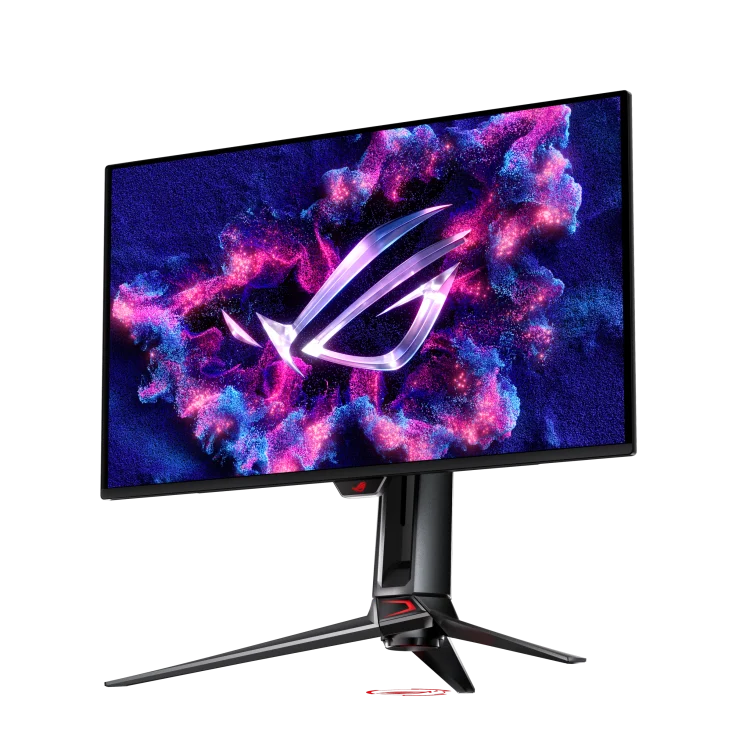
- 4.5 / 5PCMag
- 5 / 5Tom's Hardware
- 4 / 5TechRadar
A razor-sharp 27-inch 4K QD-OLED monitor combining elite 240Hz motion clarity with uncompressed DisplayPort 2.1
The ASUS ROG Swift OLED PG27UCDM is built for competitive and enthusiast gamers who want the maximum possible pixel density without stepping up to a bulky 32-inch footprint. Its greatest strengths are pristine 166 PPI sharpness, near-instantaneous pixel response times, and rare inclusion of full-bandwidth DisplayPort 2.1 and Dolby Vision. The primary trade-off is a premium price tag alongside QD-OLED raised blacks in brightly lit rooms. While rivals like Dell's Alienware AW2725Q deliver comparable in-game motion for less money, ASUS justifies its premium with superior connectivity, KVM support, and higher peak brightness.
Buy it if
- Gamers who want 4K fidelity and 240Hz speed in a compact 27-inch desk footprint
- Users needing DisplayPort 2.1 UHBR20 to run uncompressed 4K at 240Hz on modern GPUs
- Creators needing high pixel density and out-of-the-box color accuracy for dual work and play
Skip it if
- You play predominantly in bright rooms with direct sunlight on the display
- You want maximum immersion from a larger 32-inch screen for the same price
- You are shopping on a strict budget where cheaper 1440p or rival 4K OLEDs offer better value
Where to buy
We may earn a commission from purchases or qualifying sign-ups through our links. Affiliate links explained
What reviewers liked
- Exceptional pixel density of 166 PPI resolves text fringing and delivers fine detail
- Full-bandwidth DisplayPort 2.1 UHBR20 enables uncompressed 4K at 240Hz
- Dolby Vision and HDR10 support with 1,000-nit small-window peak brightness
- Virtually instantaneous 0.03ms response time and low 18ms total control lag
- Generous connectivity including 90W USB-C power delivery and a KVM switch
What they didn’t
- Substantial price premium over similarly specced 27-inch 4K competitors
- Black levels lift and take on a purple tint under direct ambient light
- Wide tripod stand requires significant desk depth
- No built-in speakers
Key specs
- Launch price
- $1,099 - $1,199
- Reported price
- $975 - $1,099
- Screen Size
- 26.5 inches
- Panel Type
- Samsung 4th-Gen QD-OLED
- Resolution & Density
- 3840 x 2160 (4K UHD), 166 PPI
- Refresh Rate
- 240Hz
- Response Time
- 0.03ms (GtG)
- Peak Brightness
- 1,000 nits (3% HDR window), ~260 nits (100% SDR sustained)
- Color Coverage
- 99% DCI-P3, 103.3% DCI-P3 volume, 97.9% sRGB
- Video Inputs
- 1x DisplayPort 2.1a (UHBR20), 2x HDMI 2.1, 1x USB-C (DP Alt, 90W PD)
- Ergonomics
- 110mm height, tilt (-5° to +20°), swivel (±30°), pivot (±90°)
- Weight
- 16.8 lbs (7.6 kg) with stand
In depth
Picture quality: brightness, contrast, colour
Packing a 3840 x 2160 resolution into a 26.5-inch panel delivers a pixel density of roughly 166 pixels per inch. TFTCentral and RTINGS observed that this density largely eliminates the text fringing that bothered users on earlier 1440p OLED monitors, producing sharp fonts and refined desktop detail. In lab measurements conducted by Tom's Hardware, the panel registered 103.3% DCI-P3 color gamut volume and 97.9% sRGB coverage, with an out-of-the-box Delta E error of 1.23, meaning factory calibration requires virtually no user correction. In SDR mode, RTINGS and TechPowerUp measured sustained full-screen brightness around 260 nits when utilizing the Uniform Brightness setting, ensuring stable luminance without aggressive automatic dimming. Contrast in light-controlled environments is effectively infinite due to self-emissive pixels shutting off completely.
Motion, refresh rate and gaming features
Motion performance is pristine. The 240Hz refresh rate combined with near-instantaneous 0.03ms gray-to-gray response times eliminates ghosting and trailing. In input latency testing, Tom's Hardware measured an 18ms total control lag score, tying with the fastest 4K gaming monitors tested to date. ASUS includes certification for both Nvidia G-Sync Compatible and AMD FreeSync Premium Pro to prevent tearing. Testers at TFTCentral noted that ASUS’s OLED Anti-Flicker 2.0 system successfully curbs the fluctuating luminance swings that typically plague variable refresh rate OLED gaming in dark scenes. For lower-framerate sources, ASUS also provides Extreme Low Motion Blur (ELMB) black-frame insertion up to 120Hz.
HDR performance
HDR is one of the PG27UCDM's strongest attributes. Unlike many competing gaming displays, ASUS includes support for both standard HDR10 and Dolby Vision. Tom's Hardware verified full compatibility with Dolby Vision sources including streaming hardware, praising its dynamic tone mapping over standard static HDR. In luminance testing across small windows (up to a 3% APL pattern), peak brightness reached 1,000 nits, delivering impactful highlights against pure blacks with zero haloing or blooming. RTINGS confirmed accurate EOTF PQ tracking, showing that highlights ramp smoothly without prematurely blowing out details in specular highlights.
Design, stand and ports
ASUS equips the PG27UCDM with an expansive connectivity suite. The primary DisplayPort connector uses the DisplayPort 2.1a UHBR20 standard, delivering 80Gbps of bandwidth so compatible graphics cards can drive uncompressed 4K at 240Hz without Display Stream Compression (DSC). You also get two full-bandwidth HDMI 2.1 ports and a USB-C port that supports DisplayPort Alt Mode and provides 90W of USB Power Delivery alongside an integrated KVM switch. The chassis features a sturdy metal stand offering height, tilt, swivel, and 90-degree pivot adjustment, as well as a 1/4-inch tripod thread on top for mounting webcams or lights. However, PCMag and TechRadar noted that the wide tripod base consumes considerable desk space, and there are no built-in speakers.
Viewing angles, reflections and burn-in risk
The QD-OLED panel maintains wide viewing angles with minimal color shift off-axis. ASUS uses a semi-gloss anti-reflective coating that preserves sharp clarity. However, as highlighted by RTINGS and TFTCentral, standard QD-OLED panels lack an internal polarizing layer, which causes black levels to elevate and reveal a subtle purplish tint under strong direct room lighting. For burn-in protection, ASUS integrates a custom graphene-backed heatsink for fanless cooling, backed by its OLED Care Pro suite. This package includes pixel cleaning, taskbar dimming, and an integrated Neo Proximity Sensor that automatically puts the monitor to sleep when you walk away. ASUS covers the panel with a three-year warranty that includes burn-in coverage.
Price and value
The ROG Swift OLED PG27UCDM debuted at $1,099 to $1,199, with street prices typically settling between $975 and $1,099. That represents a noticeable price premium over competitor displays like Dell’s Alienware AW2725Q, which routinely sells for roughly $200 less. Reviewers agree that shoppers paying the extra money are primarily funding the full-speed DisplayPort 2.1 UHBR20 connection, Dolby Vision licensing, 90W USB-C power delivery, and KVM capability. If those specific features align with your setup, the value proposition holds up well against flagship alternatives.
Is it worth the money?
Demands an approximate $150 to $200 premium over competing 27-inch 4K OLEDs, justified primarily by full DisplayPort 2.1 bandwidth, Dolby Vision decoding, and a 90W KVM hub.
Also consider
- Dell Alienware AW2725Q
Offers matching 27-inch 4K 240Hz QD-OLED picture quality and motion at a noticeably lower price, though it lacks DisplayPort 2.1 and KVM features.
- ASUS ROG Swift OLED PG32UCDM
Provides identical 4K 240Hz QD-OLED performance on a larger 32-inch screen for users who prefer visual immersion over maximum pixel density.
- ASUS ROG Swift OLED PG32UCDP
Uses a 32-inch WOLED panel with deeper blacks in bright rooms and features a dual-mode 480Hz 1080p esports toggle.
Reviews we read
This roundup summarizes professional reviews and published specifications; Next Interrupt did not test the product. Roundup updated October 28, 2026. How we work
- RTINGS — ASUS ROG Swift OLED PG27UCDM Monitor Review
- Tom’s Hardware — Asus ROG Swift PG27UCDM 4K 240 Hz QD-OLED gaming monitor review: High-end in every way
- TechRadar — I love the 27-inch Asus ROG Swift OLED PG27UCDM 4K monitor, but I find its design flaws baffling
- TFTCentral — Asus ROG Swift PG27UCDM Review