Phones & tablets / Review roundup
Samsung Galaxy Tab S11 Ultra
MediaTek Dimensity 9400+
- 5 / 5What Hi-Fi?
- 4.0 / 5PCMag
- 4 / 5TechRadar
A massive OLED slate with outstanding multimedia credentials that struggles to replace a traditional laptop
The Samsung Galaxy Tab S11 Ultra suits digital artists, media enthusiasts, and heavy multitaskers who want maximum screen space on an Android tablet. Its primary strength is the expansive 14.6-inch Dynamic AMOLED 2X display paired with an included S Pen and rare IP68 water resistance. The main catch is its sheer physical footprint and Android software limitations, which prevent it from serving as a true laptop replacement despite its high cost. Against its chief rival, Apple's iPad Pro, the Tab S11 Ultra offers more screen area and better aspect ratios for video, though Apple maintains a wide lead in raw chip performance and professional tablet apps.
Buy it if
- Digital illustrators and note-takers who want an expansive canvas with a bundled S Pen
- Movie enthusiasts seeking an ultra-thin widescreen OLED display with quad speakers
- Mobile professionals who multitask heavily using windowed Android apps
Skip it if
- You need a compact, handheld tablet for reading comfortably on a commute
- You expect a complete replacement for a macOS or Windows laptop workflow
- You require workstation-grade processing power for heavy 4K/8K video editing
Where to buy
We may earn a commission from purchases or qualifying sign-ups through our links. Affiliate links explained
What reviewers liked
- Expansive 14.6-inch 120Hz Dynamic AMOLED display with anti-reflective coating
- Bundled S Pen stylus included in the box at no extra charge
- IP68 water and dust resistance, unmatched among flagship rivals
- Extremely thin 5.1 mm chassis
- Expandable storage via microSD slot supporting cards up to 2TB
What they didn’t
- Enormous footprint and 692-gram weight make one-handed use awkward
- MediaTek Dimensity 9400+ chip trails Apple's M-series silicon in raw benchmarks
- Android tablet software and DeX mode cannot fully replace a desktop operating system
- Official keyboard accessories are expensive and sold separately
Key specs
- Launch price
- $1,199.99 (256GB / 12GB RAM)
- Reported price
- $1,075 to $1,099 on sale
- Display
- 14.6-inch Dynamic AMOLED 2X (2960 x 1848), 120Hz, anti-reflective, up to 1,600 nits
- Processor
- MediaTek Dimensity 9400+
- RAM
- 12GB or 16GB
- Storage
- 256GB, 512GB, 1TB (expandable up to 2TB via microSD)
- Battery & Charging
- 11,600 mAh, 45W wired charging
- Dimensions & Weight
- 326.3 x 208.5 x 5.1 mm; 692 g (Wi-Fi) / 695 g (5G)
- Durability
- Armor Aluminum chassis, IP68 dust/water resistance
- Stylus
- S Pen included in box
- Operating System
- Android 16 with One UI 8 (7 years of OS and security updates)
In depth
Design and durability
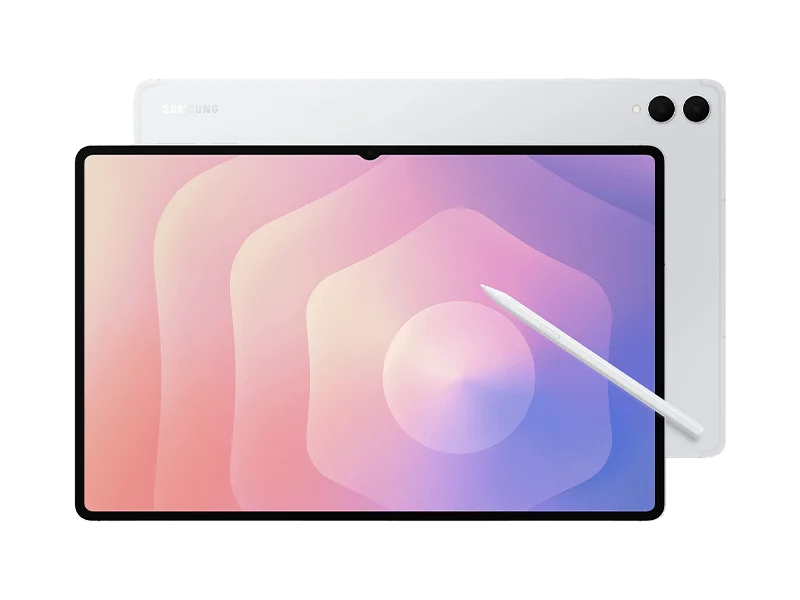
Despite housing a 14.6-inch display, the Galaxy Tab S11 Ultra measures just 5.1 mm thick and weighs 692 grams for the Wi-Fi model (695 grams for the 5G version). The chassis is constructed from Armor Aluminum, and outlets like TechRadar and PCMag emphasized that Samsung remains one of the few brands offering full IP68 water and dust resistance on a flagship tablet, meaning it can survive submersion in water. However, reviewers universally observed that its 326.3 mm width makes it cumbersome to hold unsupported for long periods. The bundled S Pen has been redesigned with a hexagonal shape and cone tip, snapping magnetically to the tablet frame.
Display
The 14.6-inch Dynamic AMOLED 2X panel (2960 x 1848 resolution, 120Hz refresh rate) earned widespread acclaim from reviewers. What Hi-Fi? praised it as one of the most cinematic screens available on any mobile device, citing deep OLED black levels and balanced color reproduction. The screen features an effective anti-reflective coating and a peak brightness rating of 1,600 nits. TechRadar gave the display full marks, noting that its 16:10 aspect ratio shows noticeably smaller black bars when playing widescreen media compared to squarer iPad screens. A subtle display notch along the bezel houses the front-facing camera, but testers found it rarely intruded on daily tasks.
Cameras (daylight, low light, zoom, video)
The Tab S11 Ultra features a 13-megapixel primary rear camera and an 8-megapixel ultra-wide camera, along with a 12-megapixel ultra-wide front-facing lens. PCMag found that the front camera produces crisp 1080p and 4K video feeds with dependable framing for video conferences and calls. The rear cameras capture serviceable photos in bright daylight for document capture and casual reference, but image quality degrades quickly in dim light with visible noise and soft textures. Reviewers agreed that holding a nearly 15-inch metal slate to take photos feels clumsy, so the rear cameras remain secondary utility tools rather than primary photography hardware.
Performance and gaming
Samsung equipped the Tab S11 Ultra with the 3nm MediaTek Dimensity 9400+ processor and either 12GB or 16GB of RAM. In benchmark testing, Tom's Guide logged a Geekbench single-core result of 2,811 and a multi-core score of 9,126, alongside 3DMark Wild Life Extreme Unlimited results of 6,575 points at 39 fps. Testers found that split-screen multitasking and demanding games like Asphalt Legends run fluidly without noticeable thermal throttling. However, TechRadar and Tom's Guide pointed out that while GPU performance is strong, the Dimensity silicon still falls significantly short of the raw computing power found in Apple's M-series iPad Pro tablets.
Battery life and charging speed
Power comes from an 11,600 mAh battery with support for 45W wired charging. In PCMag's battery rundown test, the tablet ran for 11 hours and 10 minutes. TechRadar recorded 11 hours while streaming continuous 1080p video at full brightness, representing roughly a two-hour improvement over the prior generation. A full charge from near empty requires about 90 minutes using a 45W USB Power Delivery brick, though reviewers reminded shoppers that Samsung does not include a power adapter in the box.
Software and update promise
The tablet ships with Android 16 and Samsung's One UI 8, backed by a commitment to seven years of major operating system updates and security patches. Samsung DeX has been improved to support multiple virtual desktops and flexible external monitor setups. Reviewers at Tom's Guide and PCMag appreciated Galaxy AI tools like Sketch to Image and Gemini Live integration. Even so, both outlets noted that Android's limited ecosystem of desktop-grade professional applications and window management quirks keep it from truly replacing a Windows or Mac laptop.
Price and storage options
The Galaxy Tab S11 Ultra launched with a starting price of $1,199.99 for the 256GB storage and 12GB RAM configuration. Stepping up to 512GB runs approximately $1,319, while the top-tier 1TB model with 16GB RAM retails for $1,619. Retail discounts at outlets like Amazon and Best Buy frequently bring the base model down to between $1,075 and $1,099. Reviewers appreciated that Samsung bundles the S Pen in the box and retains a microSD card slot supporting expansions up to 2TB, though the optional Book Cover Keyboard quickly pushes the overall investment past $1,400.
Is it worth the money?
The inclusion of an S Pen in the box and a microSD card slot for up to 2TB expansion helps justify the price, though the expensive official keyboard cover is sold separately.
Also consider
- Apple iPad Pro 13-inch (M4)
Provides substantially faster processing silicon and a richer library of professional creative apps, though the stylus and keyboard cost extra.
- Samsung Galaxy Tab S11
Shares the same MediaTek processor and software package in a much more portable, handheld-friendly 11-inch form factor for $400 less.
- Microsoft Surface Pro 11
Runs full desktop Windows 11 with superior keyboard typing ergonomics if your priority is a true laptop replacement for office workflows.
Reviews we read
This roundup summarizes professional reviews and published specifications; Next Interrupt did not test the product. Roundup updated November 1, 2026. How we work
- Tom's Guide — I tested the Samsung Galaxy Tab S11 Ultra for a week — here's what I like and what I don't
- What Hi-Fi? — Samsung Galaxy Tab S11 Ultra review: cinematic movies on the move
- TechRadar — Samsung Galaxy Tab S11 Ultra review: a fantastic premium tablet that's hampered by mid-range specs
- PCMag — Samsung Galaxy Tab S11 Ultra Review: A Massive Android Tablet for Pros