Smart home & cameras / Review roundup
Qidi Q2
single filament option
- 4.5 / 5TechRadar
- 4.0 / 5PCMag
- 3.0 / 5Tom's Hardware
An enclosed CoreXY 3D printer that brings active chamber heating and engineering filaments to the budget class
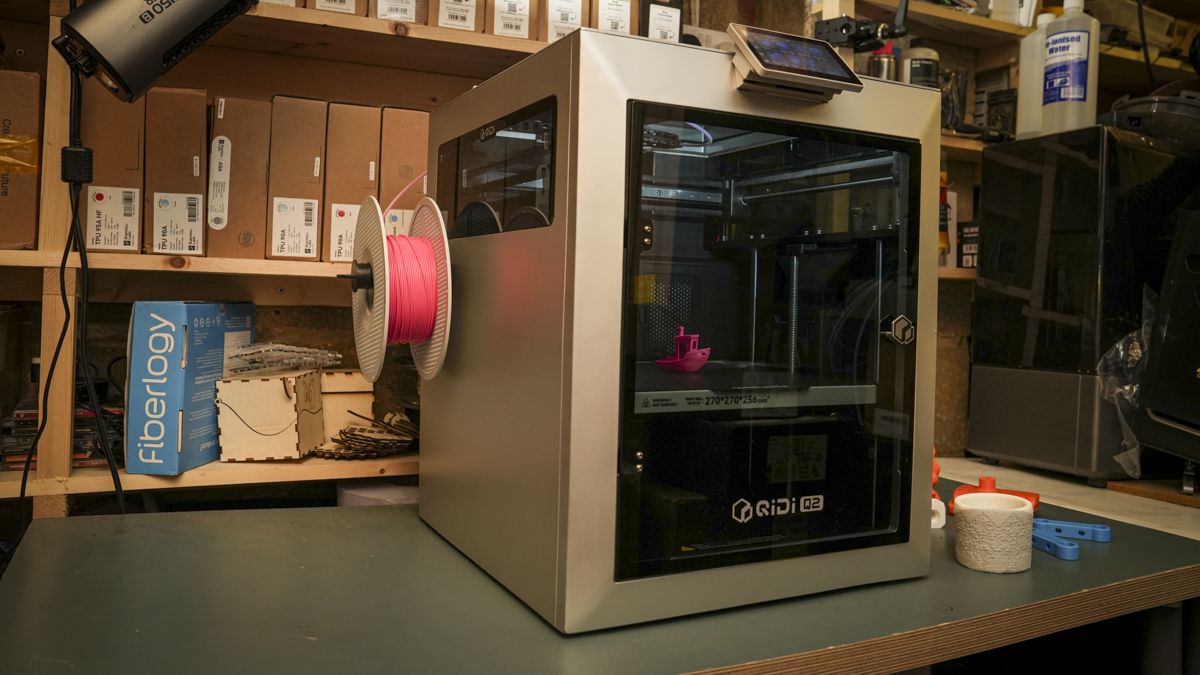
The Qidi Q2 is best for makers, engineering students, and workshop tinkerers who need to print high-temperature materials like ABS, PC, and nylon without spending thousands. Its biggest strength is thermal capability: an actively heated 65°C chamber and a 370°C hardened nozzle deliver warp-free functional prints at an unmatched price. The main catch is unpolished slicer integration and default tuning that can produce minor Z-banding until dialled in. While the rival Bambu Lab P2S offers a more seamless out-of-the-box user experience and quieter operation, it lacks active chamber heating and full open-source Klipper access.
Buy it if
- Printing engineering materials like ABS, ASA, PC, and carbon-fiber blends on a budget
- Hobbyists and workshops wanting open-source Klipper firmware and local-only network control
- Makers needing reliable first layers via automatic nozzle load-cell bed leveling
Skip it if
- You want a flawless multi-color printing setup (reviewers recommend skipping the Qidi Box add-on)
- You prefer a whisper-quiet desktop printer for a bedroom or shared living space
- You expect a perfectly polished, zero-tinker software experience right out of the box
Where to buy
We may earn a commission from purchases or qualifying sign-ups through our links. Affiliate links explained
What reviewers liked
- Active 65°C chamber heating and 370°C nozzle at an accessible price point
- Load-cell nozzle-touch sensor produces reliable, hassle-free first layers
- Open-source Klipper architecture with full local Fluidd web interface access
- Generous 270 x 270 x 256 mm build volume inside a compact enclosed footprint
- Built-in air filtration with activated carbon and HEPA filtration
What they didn’t
- Default slicer profiles can produce minor Z-banding until manually fine-tuned
- Chamber and auxiliary cooling fans are loud during high-speed printing
- Occasional software quirks between the touchscreen UI and Qidi Studio slicer
Key specs
- Launch price
- $499 (standalone single-filament)
- Reported price
- $449 to $499
- Build Volume
- 270 x 270 x 256 mm
- Max Hotend Temperature
- 370 °C
- Max Bed Temperature
- 120 °C
- Active Chamber Heating
- Up to 65 °C
- Max Print Speed
- 600 mm/s
- Bed Leveling
- Automatic load-cell nozzle sensor
- Motion System
- CoreXY with 1.5GT belts
- Firmware & Interface
- Klipper / Moonraker / Fluidd with 4.3-inch touchscreen
- Air Filtration
- 3-in-1 HEPA and activated carbon filter
- Dimensions & Weight
- 402 x 438 x 494 mm; 23.5 kg
In depth
Setup and app
Out of the box, the Qidi Q2 arrives almost fully assembled. Testers at Tom's Hardware and PCMag noted that getting started takes about 15 to 20 minutes, requiring minimal physical assembly beyond bolting on the rear spool holder, plugging in the 4.3-inch color touchscreen, and removing shipping brackets. PCMag praised the onscreen setup wizard, which guides users through initial network connection and automated bed leveling with visual checkmarks. For day-to-day operation, users can slice files in Qidi Studio (a fork of Bambu Studio and PrusaSlicer) or control the printer through the official mobile app. However, Tom's Hardware encountered occasional communication hiccups where filament presets selected on the physical screen mismatched those sent from Qidi Studio, requiring user verification before starting a print. Users who prefer direct control can skip the cloud app entirely and connect directly to Klipper via Fluidd on a local browser.
Core performance
The Q2 stands out in its price bracket thanks to its thermal system, comprising a 370°C hardened bimetal hotend, a 120°C heated bed, and a 65°C actively heated chamber. Tom's Hardware successfully printed engineering filaments like PA11-CF, PC, and ABS-GF without warping or layer separation, while noting that a sliding glass lid allows easy venting to prevent heat creep when printing lower-temperature materials like PLA and PETG. In dimensional benchmark testing, PCMag found the Q2 demonstrated near-perfect accuracy on mechanical tolerance tests, fitting zero-clearance pegs smoothly. TechRadar awarded it 29 out of 30 on print quality benchmarks, highlighting crisp overhangs and bridging. The main compromise is surface finish consistency: PCMag observed slight Z-banding on default slicing profiles before manual tuning. In addition, cooling and motion noise are pronounced when printing at full speeds up to 600 mm/s, making it better suited to a workshop than a quiet desk.
Privacy, local storage and subscriptions
Unlike competitors that push users toward proprietary cloud ecosystems, Qidi builds upon open-source Klipper and Moonraker firmware. There are no mandatory subscriptions, paywalled features, or forced cloud logins. TechRadar and independent testers highlighted that the Q2 can operate completely offline using local USB drives or over a local area network via Ethernet or 2.4GHz Wi-Fi. Users can access the printer directly through the native Fluidd web interface in any standard browser, giving unrestricted access to macros, configuration files, and direct local print jobs without routing telemetry to remote servers. The onboard camera provides live internal monitoring locally, and the 3-in-1 HEPA and activated carbon filtration system helps capture VOCs and particles from the enclosed print chamber.
Reliability
In long-term testing, TechRadar ran the single-filament Q2 continuously across six months in a workshop and college environment, reporting that the printer remained exceptionally dependable and resumed printing without calibration issues even after sitting idle for weeks. The load-cell nozzle sensor eliminates manual Z-offset adjustments, which both PCMag and TechRadar found delivered reliable, repeatable first-layer adhesion. While Tom's Hardware ran into severe feeding jams and friction issues when testing the optional multi-material Qidi Box unit, the single-filament standalone machine fed abrasive composites and flexible filaments like CC3D 72D TPU reliably from the external spool holder without clogging or toolhead failures.
Price
The standalone single-filament Qidi Q2 carries a list price of $499, and frequently retails on sale for around $449. PCMag and TechRadar both concluded that the standalone configuration delivers extraordinary value for the money, as finding an enclosed CoreXY printer with a 65°C heated chamber and a 370°C nozzle at this price point is exceedingly rare. Reviewers broadly advise sticking with this single-filament version over the $649 Q2 Combo, as the base machine provides the high-temperature reliability that makes the platform worthwhile while bypassing the mechanical snags of the multi-material unit.
Is it worth the money?
Reviewers agree the standalone single-filament Q2 represents outstanding value, offering active chamber heating and 370°C hotend capabilities typically restricted to printers costing twice as much.
Also consider
- Bambu Lab P2S
Offers a more refined user interface, quieter operation, and smoother out-of-the-box profiles, but costs more and lacks an active chamber heater.
- Elegoo Centauri Carbon
A competing budget enclosed CoreXY printer with easy setup, but it does not include active chamber heating for high-temp engineering plastics.
- Qidi Plus4
Features a larger 305 x 305 x 280 mm build volume and higher chamber temperatures, but takes up substantially more desk space at a higher price.
Reviews we read
This roundup summarizes professional reviews and published specifications; Next Interrupt did not test the product. Roundup updated November 17, 2026. How we work
- TechRadar — Qidi Q2 3D printer review
- PCMag — Qidi Q2 Review: This Under-$500 3D Printer Brings the Heat
- Tom's Hardware — QIDI Q2 Combo review: Great high temp printer, but skip the box