Laptops & desktops / Review roundup
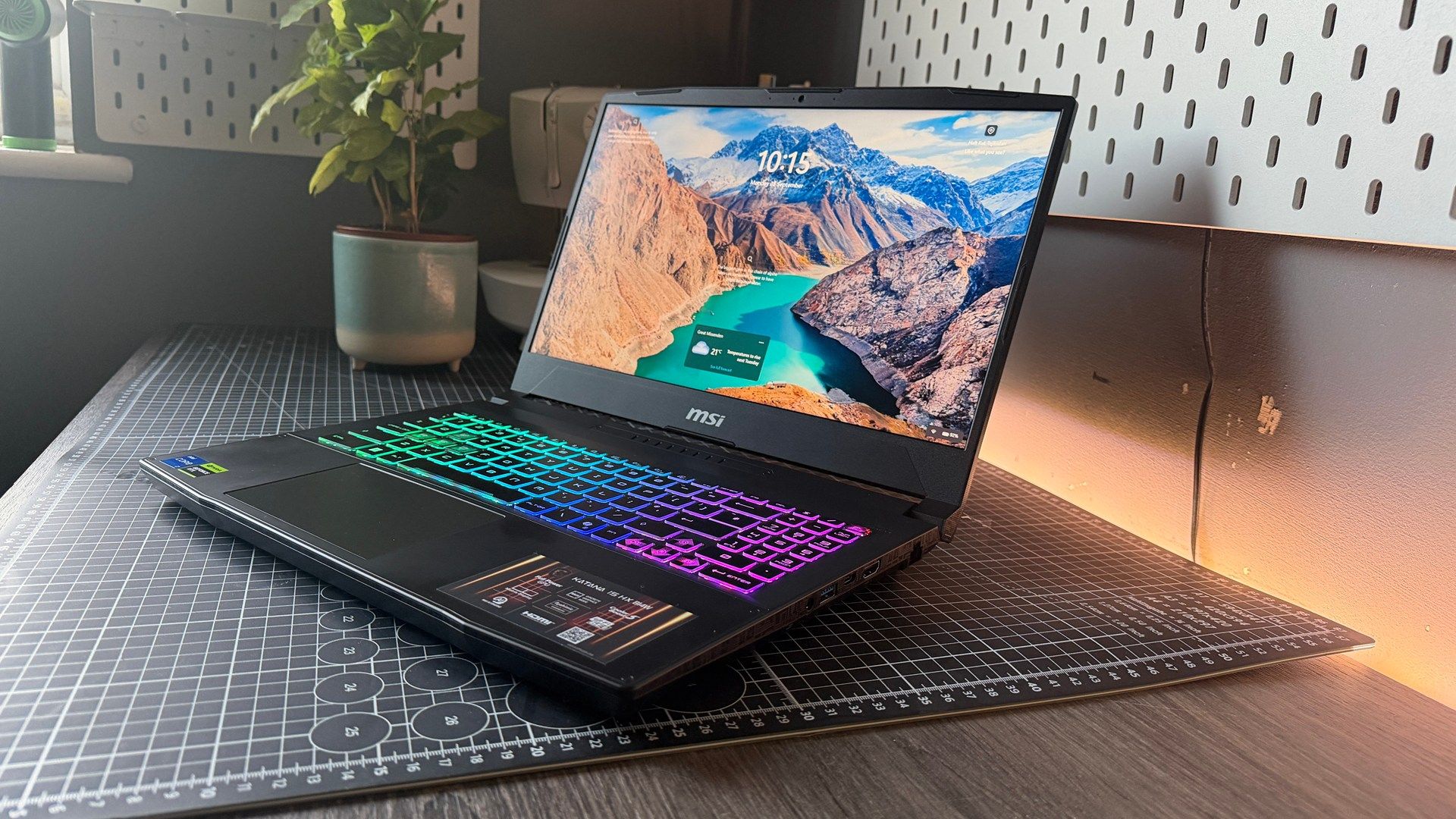
MSI Katana 15 HX B14W
MSI Katana 15 HX B14W
- 4.0/5PCMag
- 4/5Tom's Guide
- 69/100PC Gamer
A budget-friendly gaming laptop offering rapid frame rates and rich color let down by modest brightness and loud fans
The MSI Katana 15 HX B14W is best suited for budget-conscious gamers and students who want high-refresh 1080p or 1440p gaming along with effortless internal upgradeability. Its primary strength is delivering sustained 115W GPU performance and vibrant color reproduction without demanding flagship money. The chief compromise is a display that peaks at roughly 300 nits, combined with cooling fans that get loud during heavier workloads. Compared to rivals like the Lenovo Legion 5 and Acer Nitro 16, the Katana offers slightly sharper component value but trails in chassis rigidity and screen brightness.
Buy it if
- Gamers seeking high frame rates at 1080p and 1440p on a realistic budget
- Users who plan to upgrade their own RAM and NVMe SSD storage down the road
- College students needing desktop-level multi-threaded CPU performance
Skip it if
- You regularly work or game outdoors or in sunlit rooms that require high peak brightness
- You want quiet acoustic performance without using closed-back gaming headphones
- You require an all-metal chassis with zero keyboard flex
Where to buy
We may earn a commission from purchases or qualifying sign-ups through our links. Affiliate links explained
What reviewers liked
- Strong 1080p and 1440p gaming speeds backed by a 115W GPU power limit
- QHD panel option provides 99 percent DCI-P3 gamut coverage and 165Hz refresh rates
- Respectable 75Wh battery runtime for an HX-series desktop-replacement platform
- Easily accessible dual DDR5 SO-DIMM memory slots and two M.2 SSD slots
- Responsive keyboard layout with a full numeric keypad and four-zone RGB lighting
What they didn’t
- Display brightness tops out around 290 to 300 nits
- Cooling fans produce loud, intrusive noise during intensive 3D loads
- Plastic chassis exhibits noticeable flex along the deck and lid
- Equipped with a basic 720p webcam that lacks Windows Hello biometrics
Key specs
- Launch price
- $999 to $1,699 depending on GPU and screen selection
- Reported price
- $999 for entry trims, $1,200 to $1,550 for RTX 5060/5070 models
- Starting price
- $999
- Processor
- Up to Intel Core i9-14900HX (Core i7-14650HX as tested)
- Graphics
- Nvidia GeForce RTX 5050 / RTX 5060 / RTX 5070 Laptop GPU (115W TGP)
- Display
- 15.6-inch 16:9 IPS, 1920x1080 144Hz or 2560x1440 165Hz
- Memory
- 16GB or 32GB DDR5-5600 (two slots, expandable up to 96GB)
- Storage
- 512GB or 1TB PCIe 4.0 NVMe M.2 SSD (dual M.2 slots)
- Battery
- 4-cell 75Wh Lithium-Polymer
- Weight
- 2.40 kg (5.29 lbs)
- Dimensions
- 359 x 262 x 25.5 mm (14.13 x 10.31 x 1.0 inches)
In depth
Design, build and portability
The MSI Katana 15 HX B14W maintains the understated, angular styling typical of the Katana series, constructed entirely from dark matte plastic. At 25.5 mm thick and weighing 2.40 kg (5.29 lbs), it fits standard gaming laptop dimensions but carries noticeable bulk in a backpack compared to slim alternatives. Reviewers at Tom's Guide appreciated the clean lid aesthetics and restrained exterior accents, noting that the chassis feels sturdy enough for regular desk duty. However, PC Gamer and community testers noted some chassis flex when torqued and minor seam movement at the edges if squeezed into a packed bag. Portability is strictly that of a desk-to-desk machine rather than an ultra-mobile daily carry.
Display
MSI offers the Katana 15 HX with two primary 15.6-inch panel options: a budget 1080p 144Hz screen and a higher-tier 2560x1440 (QHD) 165Hz IPS-level panel. The QHD variant received strong marks for color rendition; PC Guide recorded 100% sRGB and 99% DCI-P3 coverage alongside an average Delta E of 0.97, making it remarkably color-accurate for photo editing and gaming alike. Tom's Guide echoed praise for the panel's motion handling and rich hues. The primary shortcoming across tests was luminance. Both Tom's Hardware and PCMag noted that peak brightness registers near 290 to 300 nits, which can make darker scenes in games look muted in bright rooms. The base 1080p panel suffers further from mediocre saturation, prompting reviewers to recommend springing for the QHD screen if budget allows.
Performance in everyday and demanding work
Equipped with Intel 14th Gen Raptor Lake-HX processors and RTX 50-series discrete graphics running at a full 115W TGP, the Katana delivers stout computing power. LaptopMedia found the 115W RTX 5070 configuration set benchmark records in its class, pushing 173 fps in Counter-Strike 2 at native 1440p resolution on Very High settings. In demanding titles like Cyberpunk 2077, reviews recorded steady averages between 57 and 65 fps at 1440p. Daily multitasking and heavy productivity benefit from the 16-core i7-14650HX or 24-core i9-14900HX, though PC Gamer noted mild CPU throttling during extended benchmark loops. Thermal management keeps internal chip temperatures under 86°C during gaming runs, but the Cooler Boost dual fans ramp up quickly and emit a loud, high-pitched whir that makes headphones practically mandatory.
Battery life
Gaming laptops paired with HX-class Intel processors rarely post marathon runtimes, but the Katana 15 HX fares better than previous iterations thanks to its 75Wh battery. In PCMag's standardized video rundown test, the Katana reached 8 hours and 11 minutes with the integrated GPU engaged, a surprisingly respectable outcome for a performance-focused rig. CNET recorded 6 hours and 14 minutes in an online streaming drain test, while LaptopMedia measured nearly 7 hours of web navigation. In everyday mixed-use environments involving web browsing, background applications, and document editing, real-world users report around 4 to 5.5 hours before needing a wall outlet.
Keyboard, trackpad, speakers and webcam
Input hardware is well sorted for gaming sessions. The chiclet keyboard offers 1.7mm key travel, responsive actuation, a dedicated number pad, and 4-zone RGB illumination with semi-translucent keycaps on the WASD and arrow clusters. While the main typing area is comfortable, PCMag noted that the numpad keys are slightly cramped. The plastic touchpad is on the smaller side and functions adequately for casual navigation, though tactile feedback on clicks is basic. PC Guide noted that the twin 2W downward-firing stereo speakers produce clear audio without reverberation or distortion at full volume, though bass response remains shallow. The 720p 30fps webcam is grainy in indoor lighting, but it does include a physical privacy shutter.
Ports and upgradeability
Connectivity is well distributed across both flanks. Ports include one USB-C 3.2 Gen 2 port supporting DisplayPort and USB Power Delivery, three USB-A ports (two USB 3.2 Gen 1 and one USB 2.0), a full-sized HDMI 2.1 port, RJ-45 Gigabit Ethernet, and a 3.5mm audio jack. Wireless connectivity covers Wi-Fi 6E and Bluetooth 5.3. Inside, MSI provides straightforward maintenance. Disassembly guides from LaptopMedia confirm that the chassis houses two accessible SO-DIMM slots supporting up to 96GB of DDR5 memory, along with two M.2 2280 PCIe 4.0 slots, allowing owners to easily expand memory and storage later on.
Price and configurations
The MSI Katana 15 HX launched with an entry-level price of $999 for base Core i7-14650HX configurations with an RTX 5050 and a 1080p display. Mainstream builds featuring an RTX 5060, 16GB of DDR5 RAM, and a 512GB or 1TB SSD typically retail between $1,200 and $1,309. High-end editions packing an RTX 5070, 32GB of RAM, and the sharper 165Hz QHD display launch around $1,599 to $1,699, regularly dropping to $1,400 to $1,550 during sales events. PC Gamer pointed out that international pricing can vary considerably, with UK configurations representing better value at launch than non-discounted US retail pricing.
Is it worth the money?
The Katana is most compelling when purchased on sale below $1,400 with an RTX 5060 or RTX 5070 and the 1440p screen, where few rivals can match its raw hardware output per dollar.
Also consider
- Lenovo Legion 5i
Provides a sturdier aluminum-and-plastic chassis, quieter cooling fans, and a brighter 16:10 display for a slightly higher price tag.
- Acer Nitro 16
Features a brighter 400-nit 16-inch 165Hz screen and superior cooling acoustics in the same entry-level bracket.
- ASUS TUF Gaming A15
Pairs AMD Ryzen efficiency with comparable GPU power, offering longer off-charger battery endurance and military-tested drop durability.
Reviews we read
This roundup summarizes professional reviews and published specifications; Next Interrupt did not test the product. Roundup updated November 9, 2026. How we work