Laptops & desktops / Review roundup
Dell XPS Googlebook
Dell XPS Googlebook (tested)
- 3.5 / 5PCMag
- 8.8 / 10Techaeris
- RecommendedTom's Guide
Dell's sleek XPS design finds a new home in Android, pairing rapid performance with notable software compromises
The Dell XPS Googlebook is built for Android loyalists and cloud-focused professionals who want top-tier ultrabook hardware paired with direct phone continuity. Its greatest asset is bringing Dell's refined 2.2-pound aluminum XPS chassis to a competitive $999.99 starting price. The main drawback is the fledgling state of Googlebook OS, which still runs many mobile Android apps stretched across the desktop and completely ditches the 3.5mm headphone jack. Against the Apple MacBook Air, the XPS offers a sharper 120Hz touchscreen and tighter Google integration, but macOS remains far more capable for legacy desktop productivity.
Buy it if
- Android and Google Pixel phone users wanting seamless mobile-to-laptop synchronization
- Frequent travelers seeking an ultra-compact, 2.2-pound machine for cloud work and streaming
- Shoppers looking for premium XPS hardware at a $999.99 entry point
Skip it if
- You rely on traditional desktop x86 utilities or corporate Windows enterprise profiles
- You need standard ports like a 3.5mm headphone jack or an HDMI output
- You want a deep, high-contrast OLED screen rather than an anti-glare IPS display
Where to buy
We may earn a commission from purchases or qualifying sign-ups through our links. Affiliate links explained
What reviewers liked
- Exceptionally compact, 2.2-pound CNC aluminum chassis
- Sharp 2.5K 120Hz variable refresh rate touchscreen with anti-glare coating
- Snappy Snapdragon X Elite performance in everyday tasks and benchmarks
- Over 18 hours of local video playback in testing
- Useful Android continuity features and Gemini AI integrations
What they didn’t
- No 3.5mm headphone jack and only two USB-C ports
- Googlebook OS still runs many apps as stretched mobile interfaces
- Web browsing battery life falls well short of video playback figures
- Steep price jumps for 32GB memory configurations
Key specs
- Launch price
- $999.99
- Reported price
- $999.99
- Base Price
- $999.99
- Weight
- 2.2 lbs (1.0 kg)
- Dimensions
- 0.50 x 11.69 x 7.90 inches (12.7 x 296.9 x 200.7 mm)
- Display
- 13.4-inch IPS touchscreen, 2560 x 1600, 120Hz (30-120Hz variable), 500 nits claimed
- Processor
- Qualcomm Snapdragon X Elite (X1E-80-100)
- Graphics
- Qualcomm Adreno X1-85
- Memory
- 16GB or 32GB LPDDR5X (soldered)
- Storage
- 512GB or 1TB NVMe SSD
- Battery Capacity
- 52 Wh
- Ports
- 2x USB Type-C (USB 3.2 Gen 2, DisplayPort 1.4, Power Delivery)
- Operating System
- Googlebook OS (Android-based)
In depth
Design, build and portability
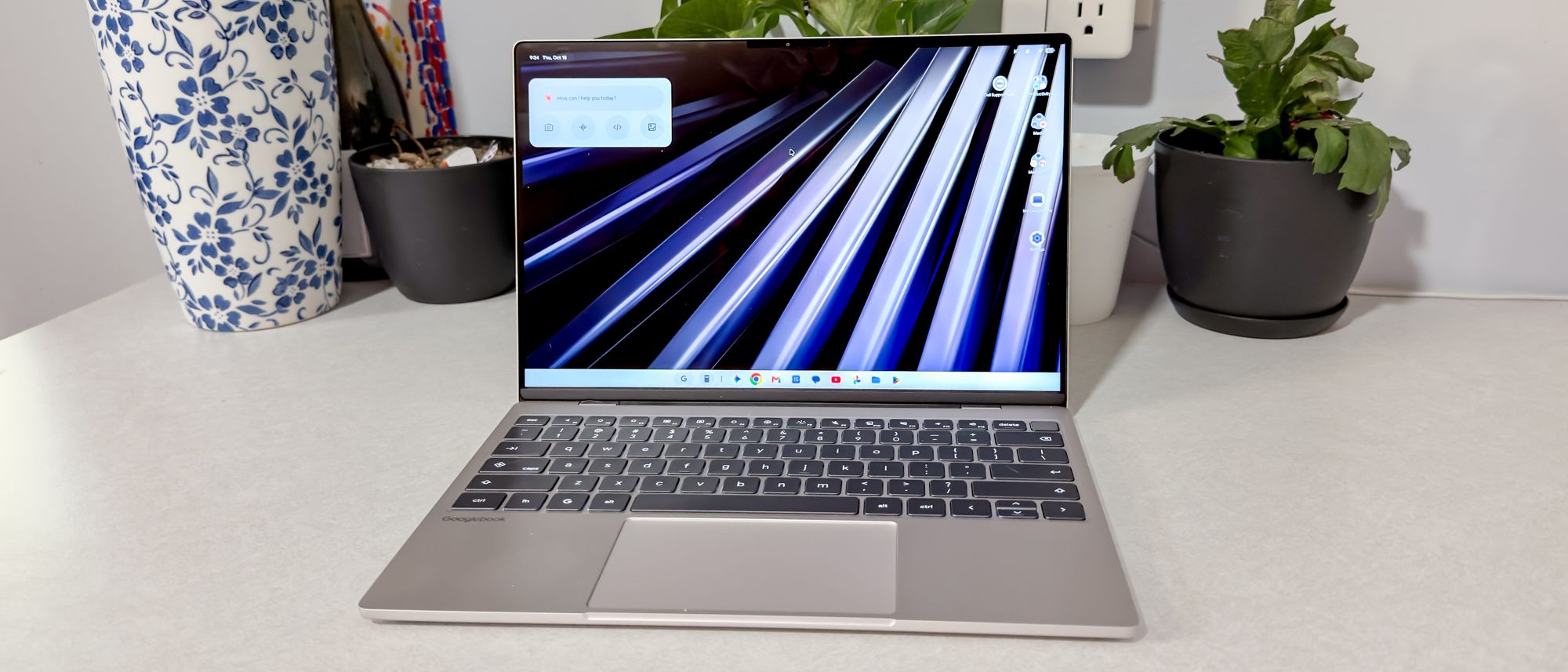
Dell brings over its XPS 13 blueprint for the Googlebook, utilizing a CNC-machined aluminum chassis that measures 0.50 inches (12.7 mm) thick and weighs 2.2 pounds (1.0 kg). PCMag highlighted it as the lightest and most portable member of the launch lineup. The exterior features Google's lid-mounted Glowbar, a multi-colored LED strip that communicates battery charging levels and assistant activity without having to open the display. Testers noted the hinge operates smoothly with a single finger, and the minimalist gold-tinted chassis feels rigid and well balanced on a lap.
Display
The laptop uses a 13.4-inch 16:10 touchscreen panel running at 2560 x 1600 resolution with dynamic variable refresh rates from 30Hz to 120Hz. Unlike the Acer and HP Googlebooks that opt for glossy OLED panels, Dell chose an IPS display treated with an anti-glare finish. In Tom's Guide laboratory testing, the screen registered 408 nits of SDR brightness, covering 108.1% of the sRGB color space and 76.6% of DCI-P3, alongside a color accuracy Delta-E rating of 0.23. Reviewers found it sharp, comfortable for long reading sessions, and responsive to touch input, though black levels lack the depth found on OLED competitors.
Performance in everyday and demanding work
Powered by Qualcomm's 12-core Snapdragon X Elite (X1E-80-100) processor and 16GB of LPDDR5X memory, the laptop handles multi-tab web browsing, document creation, and Android app multitasking without sluggishness. In synthetic testing by Tom's Guide, it reached 2,997 in Geekbench 6 single-core, 14,724 in Geekbench 6 multi-core, and 6,688 points (40 fps) in 3DMark Wild Life Extreme. Local AI functions, such as the Rambler stream-of-consciousness dictation tool, operate smoothly. However, reviewers at Tom's Hardware and PCMag pointed out significant platform limits: Googlebook OS still scales many mobile phone apps awkwardly across the 13-inch canvas, and standard x86 desktop utilities cannot run.
Battery life
Battery performance diverged sharply depending on the nature of the test. In PCMag's local video rundown, the 52 Wh battery lasted 18 hours and 18 minutes, matching Dell's claims of up to 16 hours of continuous video streaming. Under heavier, connected workloads, runtime dropped: Tom's Guide's battery test—which continuously cycles through 30 live websites at 150 nits over Wi-Fi—recorded 10 hours and 4 minutes. While that ensures a full standard workday off the charger, it lagged behind the HP Googlebook 14 (11 hours 52 minutes) and the MacBook Air M5 (15 hours 28 minutes) under identical testing.
Keyboard, trackpad, speakers and webcam
The laptop uses a edge-to-edge lattice keyboard with 0.8mm of key travel, allowing PCMag's reviewer to comfortably match their typical 75 words per minute typing cadence. The trackpad is a seamless glass surface integrated directly into the palm rest with haptic feedback. A 1080p webcam is housed in the slim upper bezel, supported by dual microphones that handle noise reduction adequately for Google Meet calls. The quad-speaker configuration (two tweeters and two woofers) supports Dolby Atmos, delivering clear speech and reasonable separation, though Techaeris reported audible distortion when volumes are pushed to the upper limit.
Ports and upgradeability
Port selection is exceptionally sparse. Dell provides just two USB Type-C ports (USB 3.2 Gen 2 at 10Gbps, supporting DisplayPort 1.4 and Power Delivery), placing one on each side of the machine. There is no 3.5mm headphone jack, SD card reader, or USB-A port, obligating users to rely on Bluetooth audio or carry adapters. Upgradeability is virtually nonexistent: the Snapdragon processor and LPDDR5X RAM are permanently soldered to the motherboard, leaving the internal M.2 NVMe SSD as the only component that can be replaced after purchase.
Price and configurations
The XPS Googlebook starts at $999.99 for a configuration equipped with the Snapdragon X Elite chip, 16GB of RAM, and a 512GB SSD, bundled with 12 months of the Google AI Pro plan. Dell also lists upgraded models with 32GB of RAM: a 512GB version for $1,599.99 and a 1TB version for $1,799.99. PCMag noted that the price-to-performance appeal drops off immediately beyond the base model, advising buyers against paying the steep $600 premium just to double the system memory.
Is it worth the money?
The base $999.99 model with 16GB of RAM and 512GB of storage offers the best balance of price and premium hardware; stepping up to 32GB adds a punitive $600 surcharge.
Benchmarks
PERFORMANCE
Benchmarks
sRGB
Higher is better · %Tom’s Guide · full test results ↗Published 2026-10-16 · checked 2026-10-16
sRGB · Dell XPS Googlebook: Dell XPS Googlebook (tested)
Results apply to this publication’s tested models and settings. Check those details before comparing another review.
Test data and methodology
| Product | Result | Test scope |
|---|---|---|
| Dell XPS Googlebook | 108.1 | Reviewed model only |
Bars start at zero. Results apply to the tested configuration and settings. Missing products are never assigned zero.
Also consider
- Apple MacBook Air 13
Provides a mature desktop operating system, longer real-world web browsing battery life, and a 3.5mm headphone jack for around the same entry price.
- HP Googlebook 14
Offers an OLED display, a larger 70 Wh battery that lasted longer in web rundown tests, and a 3.5mm audio jack, starting at $1,299.
- Dell XPS 13 (Windows 11)
Shares the same ultra-slim aluminum chassis but runs full Windows 11, ensuring native compatibility with traditional desktop programs.
Reviews we read
This roundup summarizes professional reviews and published specifications; Next Interrupt did not test the product. Roundup updated October 22, 2026. How we work
- Tom's Guide — I tested the Dell XPS Googlebook and it's an Android fan's dream laptop
- PCMag — Dell XPS Googlebook Review: The Prettiest and Most Portable Android Laptop So Far