Laptops & desktops / Review roundup
Asus Zenbook A14
Snapdragon X2 Elite (X2E-88-100) (4.0GHz, 18 Cores)
- 4 / 5TechRadar
- 4.25 / 5Ultrabookreview
- 4.5 / 5Trusted Reviews
- 84%Notebookcheck
An ultralight Ceraluminum notebook pairing 18-core Snapdragon speed with marathon battery life
The Asus Zenbook A14 is an excellent choice for frequent travelers and remote professionals who want a full-featured Windows laptop that weighs under one kilogram. Its combination of an 18-core Snapdragon X2 Elite chip, sturdy Ceraluminum chassis, and true all-day stamina makes it one of the easiest ultraportables to carry. The main drawbacks are a screen capped at 60Hz and 1200p resolution, alongside occasional Windows on ARM gaming incompatibilities. Compared to Apple's MacBook Air, the Zenbook is lighter and offers a wider port selection, even if Apple still holds the single-core speed lead.
Buy it if
- Frequent commuters wanting an ultralight sub-1kg laptop
- Professionals who need 16 to 20 hours of untethered productivity
- Typists looking for excellent keyboard travel in a slim chassis
Skip it if
- You require a high-refresh 120Hz display or 3K resolution
- Your workflow relies on anti-cheat PC gaming or legacy x86 kernel drivers
Where to buy
We may earn a commission from purchases or qualifying sign-ups through our links. Affiliate links explained
What reviewers liked
- Weighs only 980 grams in a rigid, smudge-resistant Ceraluminum chassis
- Class-leading battery life reaching 16 hours in web browsing tests
- Huge CPU gains over first-generation Snapdragon X chips
- Includes HDMI 2.1 and USB-A alongside two USB4 ports
- Near-silent operation during standard productivity tasks
What they didn’t
- OLED screen is limited to a 60Hz refresh rate and 1920 x 1200 resolution
- Fans get loud under maximum sustained workloads
- Premium launch pricing compared to base-tier configurations
Key specs
- Launch price
- $1,349
- Reported price
- $1,149 to $1,250
- Starting Price
- $1,349
- Processor
- Qualcomm Snapdragon X2 Elite X2E-88-100 (18 cores, up to 4.0GHz)
- Graphics
- Qualcomm Adreno X2-90 integrated GPU
- NPU
- Qualcomm Hexagon (80 TOPS)
- Display
- 14.0-inch 16:10 OLED, 1920 x 1200, 60Hz, 400 nits SDR / 600 nits HDR
- Memory
- 32 GB LPDDR5x-9523 (soldered)
- Storage
- 1 TB PCIe 4.0 NVMe M.2 2280 SSD
- Battery
- 70 Wh, 100W USB-C charging
- Weight
- 0.98 kg (2.17 lbs)
- Dimensions
- 310.7 x 213.9 x 13.4 mm (12.23 x 8.42 x 0.53 in)
In depth
Design, build and portability
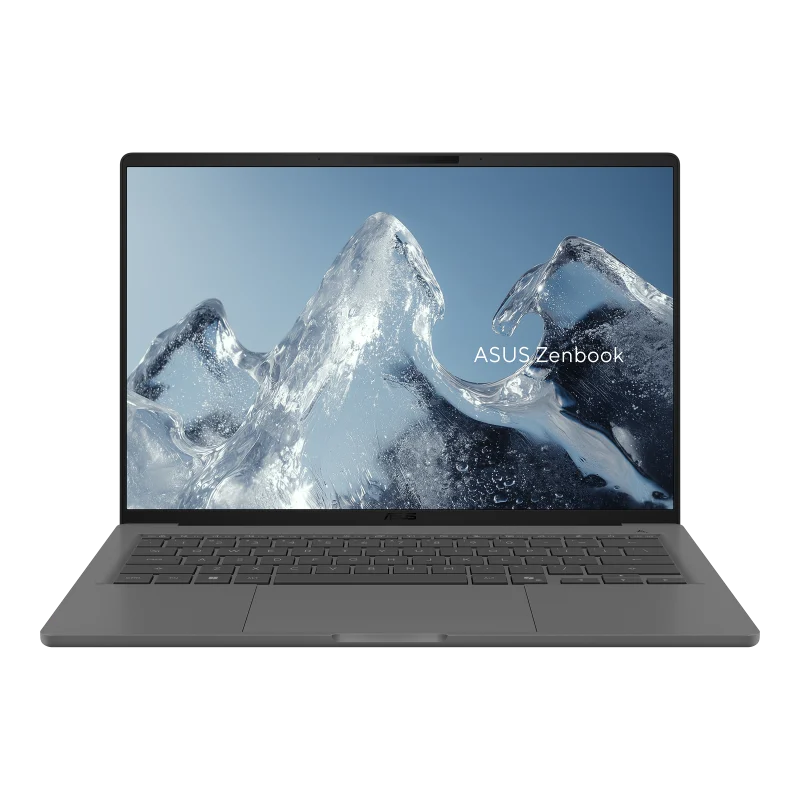
The Zenbook A14 stands out primarily for its portability. Asus built the chassis from Ceraluminum, a specialized aluminum-magnesium alloy treated with a ceramic finish that resists fingerprints and scratches better than conventional anodized aluminum. Weighing roughly 980 grams (2.17 pounds) and measuring 13.4 mm thick, the laptop feels featherlight in hand. Outlets like TechRadar and Ultrabookreview noted that the chassis exhibits surprisingly little flex around the keyboard deck and lid despite the sub-kilogram weight. The hinge allows opening the lid with a single finger, and the overall minimalist styling in Zabriskie Beige earned broad praise across reviews.
Display
The laptop features a 14.0-inch 16:10 OLED non-touch panel with a resolution of 1920 x 1200 pixels. Reviewers recorded 400 nits of typical SDR brightness, peaking at 600 nits for HDR content, alongside complete 100% DCI-P3 color gamut coverage. While visual contrast and saturation are strong due to deep OLED black levels, Notebookcheck and TechRadar pointed out two significant trade-offs: the panel is locked to a 60Hz refresh rate and Full HD-level resolution. In a market where competitors offer sharper 2.8K or 3K panels running at 120Hz, the screen is functional and vibrant, but modest for a premium machine.
Performance in everyday and demanding work
The 18-core Snapdragon X2 Elite (X2E-88-100) architecture represents a dramatic leap over the first-generation Snapdragon X platform. Notebookcheck documented a 55% improvement in single-core speeds and a 128% jump in multi-core benchmarks compared to the 2025 predecessor. In multi-threaded workloads like HandBrake encoding and multi-core Cinebench runs, the chip outperformed competing Intel Core Ultra and AMD Ryzen chips, with Apple's M-series silicon maintaining an edge only in single-threaded tests. Everyday office multitasking is instantaneous and smooth. Under light workloads, fan noise remains inaudible or peaks around 28 dB(A) in whisper mode. Pushed to sustained maximum power, however, the dual cooling fans become noticeably loud. The Adreno X2-90 graphics handle photo editing and light gaming, though anti-cheat restrictions still limit compatibility with certain competitive PC games.
Battery life
Asus packed a large 70 Wh battery into the Zenbook's compact body, which results in class-leading endurance. In Notebookcheck's standardized Wi-Fi web browsing test at 150 nits, the Zenbook A14 lasted approximately 16 hours on a single charge. Ultrabookreview logged upwards of 20 hours of offline video playback and continuous light office productivity. TechRadar noted that while Asus's claim of 32 hours of continuous playback is overly optimistic for everyday use, the machine reliably delivers multi-day operation between charges, comfortably clearing two full eight-hour workdays. Recharging is handled via the bundled 100W USB-C power brick.
Keyboard, trackpad, speakers and webcam
Ergonomics are a high point. Ultrabookreview noted the chiclet keyboard delivers better key travel and snappier tactile response than Asus's thinner Zenbook S14. The glass touchpad is spacious, smooth, and tracks multi-finger Windows gestures cleanly. For video conferencing, the 1080p webcam delivers crisp images and includes an infrared sensor for Windows Hello facial recognition login. Reviewers at MacSources and Ultrabookreview found the downward-firing stereo speakers surprisingly punchy and clear, avoiding the tinny distortion common to laptops weighing under a kilogram.
Ports and upgradeability
Asus avoided the minimalist port trend by equipping the Zenbook A14 with a versatile array. The left side houses two USB4 Type-C ports (offering 40 Gbps speeds, Power Delivery, and DisplayPort output), a full-sized HDMI 2.1 port, and a 3.5 mm audio combo jack. The right flank provides a standard USB-A 3.2 Gen 2 port for legacy flash drives and mice. Wireless connectivity includes Wi-Fi 7 and Bluetooth 5.4. Inside, the 32 GB LPDDR5x RAM is permanently soldered to the logic board and cannot be expanded, though the 1 TB PCIe 4.0 SSD resides in a standard M.2 2280 slot that can be replaced or upgraded.
Price and configurations
The flagship UX3407NA configuration equipped with the 18-core Snapdragon X2 Elite, 32 GB of RAM, and a 1 TB SSD carried a launch MSRP of $1,349. In the months following release, typical street pricing settled between $1,149 and $1,250, with promotional discounts periodically lowering prices further. Reviewers at TechRadar and Tom's Guide noted that while previous entry-level Snapdragon X Plus models offered higher bang-for-the-buck under $900, the X2 Elite variant justifies its higher price tag for users who need genuine multi-core compute capability.
Is it worth the money?
The 18-core Snapdragon X2 Elite model sits at a notable premium over older base chips, but retailers regularly discount it closer to $1,150, making it very competitive against sub-1kg rivals.
Also consider
- Apple MacBook Air 13 (M3 / M4)
Provides a silent fanless build, faster single-core performance, and broader app compatibility, but weighs slightly more and has fewer ports.
- Lenovo Yoga Slim 7x
Shares Qualcomm Snapdragon hardware while offering a sharper 2.8K 90Hz/120Hz OLED touchscreen, though it is slightly heavier.
- Asus Zenbook S 14
Uses the same premium Ceraluminum chassis design with an Intel Core Ultra processor for users who require native x86 software compatibility.
Reviews we read
This roundup summarizes professional reviews and published specifications; Next Interrupt did not test the product. Roundup updated October 27, 2026. How we work